 4a1037e9a9
## Summary
`/api/inference/images/generate` used fixed defaults of 9 steps and
guidance 0 when a caller left them out. Those values only suit turbo
models. Omitted `steps` and `guidance` now come from the loaded model:
the diffusers `generation_defaults` when the status reports them, else
the family table (sd.cpp and MLX). `/v1/videos` also accepts the Unsloth
Studio generation controls that `/video/generate` already had, and the
MCP `generate_image` and `generate_video` tools expose the new options.
## Changes
Images:
- The image route reads the defaults again on each retry attempt, so a
model replacement between attempts brings its own values, and it pins
the load it read them from. `/v1/images` now uses the same
`_image_generation_defaults` helper.
- A request that leaves out `steps` or `guidance` while another client's
image load is still running is pinned to "nothing loaded". The engine
then refuses the new model on its first try, and the retry reads that
model's defaults instead of running it with 9 steps and guidance 0.
- MCP `generate_image` refuses requests the engine cannot run before
uploading anything: `reference`, `edit` or `outpaint` without
`init_image`, `outpaint` without `mask_image`, and `upscale <= 1`. It
also takes `seeds` and `prompts` lists (up to 32) for a batch in one
call.
- `studio_status` image now reports `workflows`, `generation_defaults`,
`dimension_multiple`, `max_condition_images` and `prompt_hint`.
Prompt hints:
- Image and video families have an optional `prompt_hint`, returned in
the status of every engine (diffusers, sd.cpp, MLX, video). FLUX.1
Kontext, Qwen-Image-Edit, Qwen-Image 2.1 and Ideogram 4 have one. No
video family sets one yet.
- The Images and Video pages show the hint as the Prompt field's info
hint. It is hidden for external image providers.
- New bundled `image-prompting` skill, off by default. It tells the
model how to expand a short request into a detailed prompt, and to leave
steps and guidance unset so the model's defaults apply.
Videos:
- `/v1/videos` accepts `seed`, `negative_prompt`, `steps`, `guidance`,
`num_frames`, `fps`, `last_frame`, `reference_images` (up to 9) and
`reference_audios` (up to 3, as data URLs, uploads or Unsloth Studio
audio ids `{"input_id" | "clip_id" | "voice_id"}`). These work in both
JSON and multipart bodies.
- The new fields are validated before any model switch, including the
family checks, image decoding and audio id resolution. Sending both
`seconds` and `num_frames` returns 400. So do `last_frame` with
references, `input_reference` with `reference_images`, and reference
audio with no reference image.
- MiniMax-H3 always writes its clip at 24 fps, so `/v1/videos` refuses
another `fps` for it (400, `param: fps`) rather than computing the frame
count and the reported length from a rate the file never plays at. The
check runs before a switch, on the resident model, and on the pinned
snapshot that auto-switch and managed accounts use.
- `last_frame` and each `reference_images` entry take the same 32 MB
image `input_reference` takes. Before, their base64 cap stopped images
at about 24 MB. Each reference audio takes a full 24 MB clip as a data
URL. A stored reference audio is sized before it is read. Multipart
reference lists keep the order they were sent in, across the
`reference_images` and `reference_images[]` spellings, and are counted
before any file is encoded. Before an automatic switch, each reference
audio is decoded the way the engine would, so an unreadable clip is a
400 instead of a failure after the new model loads.
- One request body carries about 32 MB of inline images and audio in
all; the field descriptions say so and point larger or several audio
clips at Unsloth Studio audio ids.
- When no seed is sent, the route draws one before the retry loop,
stores it on the job and returns it in the job response. A plain
OpenAI-shaped request behaves as before, except that the response now
includes `seed`.
- MCP `generate_video` exposes the same controls, accepts `seconds` as a
number or a string, accepts fractional `seconds`, refuses images over
the 32 MB one `/v1/videos` request carries, audio over 24 MB, and field
combinations the route refuses (before it uploads any audio), and
returns the seed on the job and from `get_job`. `studio_status` video
now reports `prompt_hint`, `supports_last_frame`, `references` and
`size_presets`.
`studio/MCP.md` lists the new tool options.
## Testing
New tests: `test_image_generate_model_defaults.py`,
`test_openai_videos_controls.py`, `test_mcp_tools_video_controls.py`,
`test_mcp_status_media_slots.py`, `test_diffusion_prompt_hint.py` and
`studio/frontend/tests/images-prompt-hint.test.ts`. Updated in place:
`test_mcp_tools_images.py`, `test_mcp_tools_status.py`,
`test_mcp_tools_video.py`, `test_skills.py` and
`test_video_families.py`.
- The new and updated backend tests pass. They cover:
- each MCP refusal, checked before any route call;
- the image fill on diffusers, sd.cpp and MLX shapes, including the
model-replaced retry;
- a plain OpenAI `/v1/videos` request, which still sends
`begin_generate` exactly its old arguments plus `seed`;
- the seed surviving a restart, with old records loading `seed: null`;
- audio ids resolving in the caller's account.
- Review follow-ups (`bef45ec6b9` to `b1d07abd7c`) each come with tests
that fail on the earlier head: the H3 fps refusal (before a switch,
resident and pinned), multipart order and count, the audio size checks,
the 32 MB image and 24 MB audio caps, the MCP image budget, body cap and
pre-upload checks, fractional MCP seconds, the pre-switch audio decode
and the in-flight load retry. Affected suites at the final head (image
and video routes, `/v1/videos`, `/v1/images`, account pinning, MCP tools
and server, skills, families, prompt hints): 825 passed, 1 failed. That
one,
`test_video_download_plan_judges_a_quantized_reference_pick_per_partition`,
fails the same way on `main` here (no PyAV).
- Each fix was checked to be load-bearing. With the image fill disabled,
4 route tests fail. With the per-attempt reset removed, the
replacement-race test fails. With the video seed record line and None
filter removed, 5 tests fail.
- Affected backend suites (images, video, MCP, account media, skills,
sd.cpp, MLX, family freeze): 2,498 passed, 15 failed. 14 of the failures
fail the same way on `main` in this environment (no PyAV, and a
huggingface-hub version mismatch). The 15th,
`test_begin_load_answers_without_waiting_on_the_header_probe`, is a
timing test that passed 3 of 3 runs on its own.
- `UNSLOTH_FREEZE_UPDATE=1` regeneration of the diffusion family freeze
leaves the fixture unchanged. It records accessor outputs, not family
rows.
- Frontend: `npm run typecheck`, and 230 image and video node tests
pass.
- `ruff check` (0.16.10) is clean, and the repo formatter (ruff 0.6.9)
is a no-op on the changed files.
The UI before/after screenshots and the GPU harness runs (hero portrait
plus same-character shots with no HTTP 400s; two same-seed video takes)
follow in a comment.
<!-- ui-evidence:start -->
### UI before / after
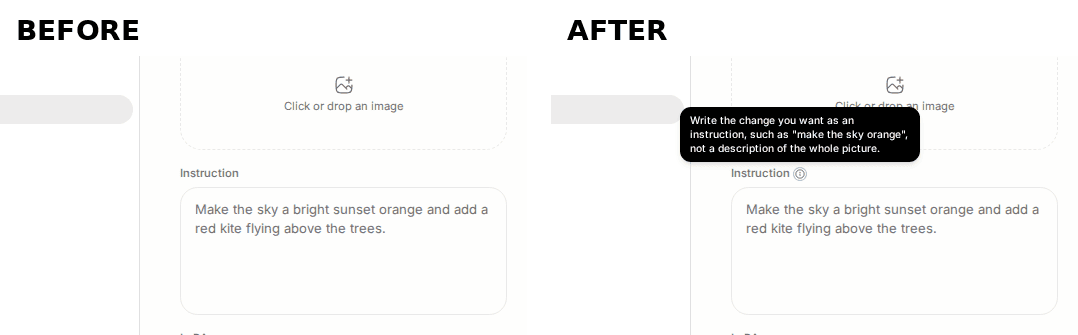
With FLUX.1 Kontext loaded, the Images page Instruction field gains an
info icon whose tooltip reads 'Write the change you want as an
instruction, such as "make the sky orange", not a description of the
whole picture.' Before this PR the field has no icon. BEFORE is the
merge base, AFTER is this PR, two separate installs, each loading the
same tiny FLUX.1 Kontext pipeline through the real load route.
<!-- ui-evidence:end -->
---------
Co-authored-by: Daniel Han <23090290+danielhanchen@users.noreply.github.com>

15 KiB
MCP in Unsloth Studio
Connect Blender MCP
Blender MCP is disabled by default. Unsloth Studio downloads a pinned, checksum-verified runtime on first enable/test and caches it on the backend machine. No commands, Git or pip installs are needed. Subsequent starts use the cache without internet. The Blender add-on is installed separately. No MCP archive or source is shipped in Unsloth Studio's Python package or desktop build.
- Open Manage MCP servers → Blender, approve the execution warning and choose Enable Blender MCP. Use a tool-capable model with MCP enabled for the chat.
- Open Setup help → Download Blender add-on for Blender's official page.
- In Blender 5.1+, enable Preferences → System → Network → Allow Online Access. Drag the website's install button into Blender twice: first to add the Blender Lab repository, then to install MCP. Alternatively, search MCP in Get Extensions after adding the repository.
- Enable and start the add-on bridge, keep Blender open, then Test connection.
A green dot means Blender is connected; amber means only the MCP server is connected.
Setup help stays in the same Blender entry. Advanced settings configure the bridge
port (default 9876) and optional Blender executable. This port is not an HTTP URL.
The bridge uses loopback on the Unsloth Studio backend machine, not a remote browser. Unsloth Studio does not install or launch Blender during setup. Approved tools can run Python, write files and launch background Blender. Existing tool permissions apply; external model providers receive tool results. Keep the unauthenticated bridge local.
The downloaded runtime excludes the large API/manual reference corpus and its three
offline documentation tools. The official source is
https://projects.blender.org/lab/blender_mcp (GPL-3.0-or-later).
The pinned revision and SHA-256 are in backend/integrations/blender/runtime.py.
Downloads are staged and verified before activation; failures leave the server
disabled and can be retried with Enable Blender MCP. Merely opening the dialog
or launching Unsloth Studio does not download anything.
Large tool catalogs
A server can expose dozens of tools with long descriptions and deeply nested parameter schemas: Notion's catalog alone is about 65,000 tokens. Every tool is listed in full while the catalog takes at most a tenth of the loaded local model's context window. External providers always get the full listing.
Past that, Studio searches tools the way Claude Code and Codex do. The model gets
mcp_tool_search, whose description names every tool with a one-line summary,
instead of the schemas. A search ranks the catalog with the SQLite FTS5 BM25 index
and rank fusion the knowledge base uses (tool names and descriptions searched
separately) and loads the best matches, exact names always; the model then calls
them with their full schemas. A tool the model calls by name loads the same way.
Up front, the listing also carries a tool a tool_choice forces, the tools mapped
to take an attached image, and, within a third of the window, the tools the chat
ran on earlier turns (so the prompt prefix the model server caches holds) and up
to five tools ranked against the user's message. Tools a turn loads stay within
half of the window, the oldest leaving first; a tool too large for that is refused
with a message naming it.
Unsloth Decisions MCP
When the Decision API is on (Settings → API), the chat's MCP menu lists
Unsloth Decisions. Enable it and a tool-capable chat model can call decide,
which asks the local Laya model the same typed questions POST /v1/systemone
answers (noul, choice and score), with the model chosen in Settings.
Other MCP clients reach the same tool at http://127.0.0.1:8888/mcp/decisions/
(use the actual Unsloth port). It takes the credentials /v1/systemone takes, so
send an Unsloth API key as Authorization: Bearer sk-unsloth-....
Unsloth Studio's own MCP server
Unsloth Studio has its own MCP server at /mcp/. Coding agents such as Claude Code and
Codex can use it to load models, chat, generate images, audio and video,
transcribe, train and export. Every tool goes through Unsloth Studio's own routes as
your API key, so it sees what that key may see and nothing more.
Turn it on
The server is off by default. While it is off, /mcp/ answers 404. Start Unsloth
Studio with UNSLOTH_STUDIO_ENABLE_MCP=1 to turn it on.
The endpoint is http://127.0.0.1:8888/mcp/ on the default port. Always use
the trailing slash. Use your own address and port when they differ, for example
the LAN address or the Cloudflare tunnel URL.
Authentication
Every request needs an Unsloth Studio API key: Authorization: Bearer sk-unsloth-….
Create one in Settings → API. Unsloth Studio refuses everything else with 401:
- no key, an empty key, or a placeholder key such as
not-needed, even when keyless API access is on; - a signed-in session token;
- a revoked or expired key;
- the keys Unsloth Studio mints for its own recipe and Deep Research workflows.
A managed account's key works too. Its tools act for that account only.
Unsloth Studio does not offer OAuth. The OAuth discovery paths answer 404, so clients that probe them fall back to the key.
A browser page from another site gets 403 Origin not allowed for Unsloth Studio MCP.
This also blocks browser-based MCP inspectors. Command-line agents send no
Origin and are not affected.
Breaking changes
The static UNSLOTH_STUDIO_MCP_TOKEN is retired. A request that sends it gets
401 with this detail:
The MCP static token is no longer supported; use an Unsloth Studio API key (sk-unsloth-…)
If the variable is still set, Unsloth Studio logs one warning at startup. Unsloth Studio no longer refuses to start when the token is missing.
The tools changed:
| Old tool | New tool |
|---|---|
list_local_models |
list_models |
get_training_status |
studio_status |
stop_training |
cancel with kind="training" |
validate_recipe |
run_recipe with mode="validate" |
get_recipe_job_status, get_recipe_job_dataset |
get_job with kind="recipe" |
load_checkpoint and export_gguf |
export_model |
studio_status and start_training keep their names, but now run as your key.
Set up an agent
One command
unsloth mcp add writes the agent's MCP entry for you. It supports
claude-code, codex, cursor and generic:
unsloth mcp add claude-code
unsloth mcp add codex --url http://192.168.1.20:8888
unsloth mcp add cursor --dry-run
- The entry names the
UNSLOTH_API_KEYenvironment variable, never the key itself, and the command never prints a key. Pick another variable with--env-var. - It finds a running Unsloth Studio on this computer, or takes
--url. --dry-runprints the entry it would write and writes nothing. Running it again changes nothing.- A config file it creates is readable by you only (mode 0600).
codexalso setstool_timeout_sec = 300.genericprints a JSON entry to paste into any other agent's config.
Then check the connection:
unsloth doctor --mcp
It checks that Unsloth Studio answers, that your key works, and that the MCP
server is on. It also warns when an agent's tool timeout is under 240 s, because
long tools such as load_model can wait that long.
By hand
Each one reads the key from the UNSLOTH_API_KEY environment variable, so set
it before you start the agent. Replace http://127.0.0.1:8888 with your own
address.
Claude Code (macOS or Linux):
claude mcp add --transport http --scope user unsloth-studio http://127.0.0.1:8888/mcp/ --header 'Authorization: Bearer ${UNSLOTH_API_KEY}'
Claude Code (Windows PowerShell):
claude mcp add --transport http --scope user unsloth-studio http://127.0.0.1:8888/mcp/ --header 'Authorization: Bearer ${UNSLOTH_API_KEY}'
OpenAI Codex:
codex mcp add unsloth-studio --url http://127.0.0.1:8888/mcp/ --bearer-token-env-var UNSLOTH_API_KEY
# Optional, for long jobs, in ~/.codex/config.toml under [mcp_servers.unsloth-studio]:
# tool_timeout_sec = 300
OpenCode, in ~/.config/opencode/opencode.json:
{
  "mcp": {
    "unsloth-studio": {
      "type": "remote",
      "url": "http://127.0.0.1:8888/mcp/",
      "oauth": false,
      "headers": {
        "Authorization": "Bearer {env:UNSLOTH_API_KEY}"
      }
    }
  }
}
Hermes Agent, in ~/.hermes/config.yaml, then run /reload-mcp in Hermes:
mcp_servers:
  unsloth_studio:
    url: "http://127.0.0.1:8888/mcp/"
    headers:
      Authorization: "Bearer ${UNSLOTH_API_KEY}"
OpenClaw, in ~/.openclaw/openclaw.json:
{
  "mcp": {
    "servers": {
      "unsloth-studio": {
        "url": "http://127.0.0.1:8888/mcp/",
        "transport": "streamable-http",
        "headers": {
          "Authorization": "Bearer ${UNSLOTH_API_KEY}"
        }
      }
    }
  }
}
Mistral Vibe, in ~/.vibe/config.toml:
[[mcp_servers]]
name = "unsloth_studio"
transport = "streamable-http"
url = "http://127.0.0.1:8888/mcp/"

[mcp_servers.auth]
type = "static"
api_key_env = "UNSLOTH_API_KEY"
api_key_header = "Authorization"
api_key_format = "Bearer {token}"
DeepSeek Harness, appended to ~/.dsh/cordis.patch.yml:
- insert:
    - id: mcp-unsloth-studio
      name: '@deepseek-ai/dsh-mcp-client'
      config:
        serverName: unsloth-studio
        transport: streamable-http
        url: "http://127.0.0.1:8888/mcp/"
        headers:
          Authorization: !!js '`Bearer ${process.env.UNSLOTH_API_KEY}`'
Tools
| Tool | What it does |
|---|---|
studio_status |
What is loaded, loading and running: chat, image, video, speech-to-text and embedding models, training, export and GPUs. |
list_models |
Models Unsloth Studio can serve, by kind or by Audio page workflow. With model, its training defaults. With source="catalog", the image, video and audio models it can download, with their size and whether they fit on the GPU now. |
load_model |
Load a chat, image, video or speech-to-text model, downloading it first if needed. Reports progress. |
unload_model |
Unload a model. |
chat |
Ask the loaded model, with optional images. Returns a cancel_id. |
embed |
Embed up to 2048 texts. |
system_one |
Ask the Decision API typed questions. The Decision API must be on. |
generate_image |
Text to image, image to image, inpaint, edit, reference, outpaint and upscale, one image or a batch of seeds or prompts. Left out, steps and guidance follow the loaded model. |
generate_audio |
Clone, speak, edit, convert, music and separate, on the loaded model or a named model. |
transcribe |
Speech to text, or translation to English. |
generate_video |
Start a video, with a seed, frame count, last frame and image or audio references. One renders at a time. Poll it with get_job. |
get_job |
The state of a video, recipe or export job. |
run_recipe |
Validate, preview or run a Data Recipe. |
datasets |
List, check, download and follow training datasets. |
start_training |
Start LLM or image LoRA training. Follow it with studio_status. |
list_training_runs |
Past runs and their checkpoints, by name. |
export_model |
Export a checkpoint to GGUF, merged weights, a LoRA adapter or the base model. |
cancel |
Stop training, a start request, image training, an export, a recipe, an image or video generation, a chat reply or a dataset download. |
Long work returns at once. Start it, then poll get_job or studio_status,
and stop it with cancel. Audio runs cannot be cancelled. Unsloth Studio runs one
export at a time, so export_model is refused while another export runs, and
cancelling an export job stops only that job's own step.
Media and files
Generated images, audio and videos are saved to Unsloth Studio's galleries, the same as
in the UI. Tools return each item's id and URL. Small items also come back
inline. Large images come back as a preview plus a link. A video comes back as a
thumbnail plus a link, and the MP4 is never sent inline. Links point at
Unsloth Studio's API, so fetch them with the same Authorization: Bearer key.
Media inputs can be an Unsloth Studio id, inline data, or a file path. A file path
works only when the agent runs on the Unsloth Studio computer and connects over
loopback. From any other computer, send the data or an Unsloth Studio id instead.
An MCP request is limited to 4 MiB, so inline data has to fit in that. Send
larger media as an Unsloth Studio id, or as a path from the Unsloth Studio computer. A remote
agent can upload a large audio file, up to 200 MiB, to POST /v1/audio/inputs with its API key
and pass the returned id as input_id. The route takes the file's raw bytes as
the request body with a Content-Length, not a multipart form or JSON, and an
optional name query parameter:
curl -X POST "http://127.0.0.1:8888/v1/audio/inputs?name=meeting.mp3" \
  -H "Authorization: Bearer $UNSLOTH_API_KEY" \
  --data-binary @meeting.mp3
transcribe sends files up to 25 MB directly. Larger files, and audio given by
id, are uploaded to Unsloth Studio first, and their transcript is saved to Audio
history. Translation needs a file under 25 MB. Transcribing from a URL or a
YouTube link is not supported. timestamps needs a speech-to-text model that
times segments, such as Qwen3-ASR (audio.cpp) or Parakeet-TDT; other models
refuse it, and translation never has timestamps.
studio_status lists the loaded audio model's audio_options, such as its
built-in voices. Pass them to generate_audio in options. A voice or other
listed value is matched without regard to case, and a value the model does not
list is refused.
Tool results never contain paths on the Unsloth Studio computer. Checkpoints are named
<run folder> or <run folder>/checkpoint-N. Exports are named relative to
Unsloth Studio's exports folder, and export_model takes only a relative
save_directory.
Prompts
The server also offers two prompts, which Claude Code shows as slash commands:
make_short_film and build_dataset_and_train. Each one reads what is loaded
and which catalog models fit on the GPU right now, then lays out the tool calls
for the job.
Known limits
- An API key cannot unload a chat model that was loaded from a local folder. Unsloth Studio shows such a model to API keys under an opaque reference, and the unload route does not resolve it. Unload it in the Unsloth Studio UI.
- Unsloth Studio runs one Data Recipe job at a time, and a recipe job id is not tied to an account. Anyone with a key who knows the id can read that job's status.
- Image LoRA training takes a dataset that is already in Unsloth Studio. There is no upload tool.
- Models can be unloaded between calls when an idle timeout is set. Tools then say to load the model again.