 f7ec00f5f7
Fixes #9962 When a video is attached to a GGUF chat model, llama-server samples it at the rate Studio sets (1 fps) but only writes a text timestamp into the prompt every 5 seconds. The model has to guess the time of the frames in between, and in practice it snaps every event to the nearest 5 second mark. That is the wrong timestamps reported in #9962 when captioning a clip. ## Change Studio now passes `--video-timestamp-interval` alongside `--video-fps`, set to two sampled frames (2000 ms at the default 1 fps). The interval follows the frame rate the user actually asked for, so `--video-fps 2` in the advanced llama-server arguments (or `LLAMA_ARG_VIDEO_FPS`) gives frames 0.5 s apart with a timestamp every second. That is the existing way to control frame spacing, and it now produces matching timestamps instead of a fixed 5 s grid. - A `--video-timestamp-interval` typed in the advanced arguments, or `LLAMA_ARG_VIDEO_TIMESTAMP_INTERVAL` in the environment, still wins and Studio adds nothing. - Builds that do not list the flag in `--help` are not sent it (same capability probe as `--video-fps`). - No UI change. Image, audio and text-only chats are unaffected; the flag only changes video prompts. Why two frames rather than every frame: llama.cpp writes each timestamp after its frame, and Qwen-VL models merge consecutive frame pairs into one temporal patch. A timestamp between every frame splits every pair, which raised Qwen3-VL prompt tokens by 1.7x. At two frames the pairs stay whole (prompt is slightly smaller than today), and Gemma 4 placed events most accurately at this spacing too. ## Results Synthetic 20 s, 640x360 clips: a gray screen that turns red for 2 s starting at a known second (14 clips, starts at 2, 3, 4, 6, 7, 8, 9, 11, 12, 13, 14, 16, 17, 18 s). Prompt: "At what time, in seconds from the start of the video, does the screen first turn red?" Temperature 0, `--video-fps 1`, llama.cpp prebuilt b11719, Q4_K_M with F16 projector. | Model | Timestamp every | Mean abs error (s) | Within 1 s | Prompt tokens | | --- | --- | ---: | ---: | ---: | | Gemma 4 E2B | 5 s (before) | 4.21 | 5/14 | 2197 | | Gemma 4 E2B | 2 frames (this PR) | 0.43 | 14/14 | 2254 | | Gemma 4 E2B | every frame | 1.00 | 14/14 | 2349 | | Gemma 4 E4B | 5 s (before) | 2.14 | 6/14 | 2197 | | Gemma 4 E4B | 2 frames (this PR) | 0.43 | 14/14 | 2254 | | Gemma 4 E4B | every frame | 0.86 | 14/14 | 2349 | | Qwen3-VL 2B | 5 s (before) | 1.86 | 6/14 | 2740 | | Qwen3-VL 2B | 2 frames (this PR) | 1.14 | 12/14 | 2575 | | Qwen3-VL 2B | every frame | 0.93 | 14/14 | 4668 | | Qwen3-VL 8B | 5 s (before) | 1.71 | 7/14 | 2740 | | Qwen3-VL 8B | 2 frames (this PR) | 0.71 | 12/14 | 2575 | | Qwen3-VL 8B | every frame | 0.79 | 14/14 | 4668 | Before the change, Gemma 4 E2B answered "5" for every clip starting at 2 through 8 s, and the Qwen models answered 5 or 10 for most clips. With no timestamps at all, Gemma answered numbers like 1000 and 1600, so the labels are what the model reads time from. For reference, typing `--video-fps 2 --video-timestamp-interval 500` in the advanced arguments brought Gemma 4 E4B to a mean error of 0.21 s (14/14 within 1 s) at 4659 prompt tokens, so users who need finer timing can still trade prompt length for it. ## Verification - `tests/test_llama_video_frame_budget.py`: 8 new tests (default interval, interval follows a typed or inherited frame rate, typed or inherited interval left alone, builds without the flag, labels land on every other frame, capability probe). 40 passed; 5 of the new tests fail with the `llama_cpp.py` change reverted. - Launch-related suites (`test_server_tuning_flags`, `test_llama_cpp_placement`, `test_load_mode_fit_matrix`, `test_metal_explicit_context_guard`, `test_model_memory_settings`, `test_llama_flag_catalog`, `test_video_chat_completions_behaviour`): 2852 passed, 32 skipped. - A text-only GGUF launched with `--video-fps 1 --video-timestamp-interval 1000` loads and answers normally. |
||
|---|---|---|
| .github | ||
| docker | ||
| images | ||
| scripts | ||
| studio | ||
| tests | ||
| unsloth | ||
| unsloth_cli | ||
| .gitattributes | ||
| .gitignore | ||
| .pre-commit-config.yaml | ||
| build.sh | ||
| cli.py | ||
| CODE_OF_CONDUCT.md | ||
| CONTRIBUTING.md | ||
| COPYING | ||
| install.ps1 | ||
| install.sh | ||
| LICENSE | ||
| MANIFEST.in | ||
| pyproject.toml | ||
| README.md | ||
| unsloth-cli.py | ||

Unsloth is the first desktop app to run and train models.
Features • Quickstart • Notebooks • Documentation
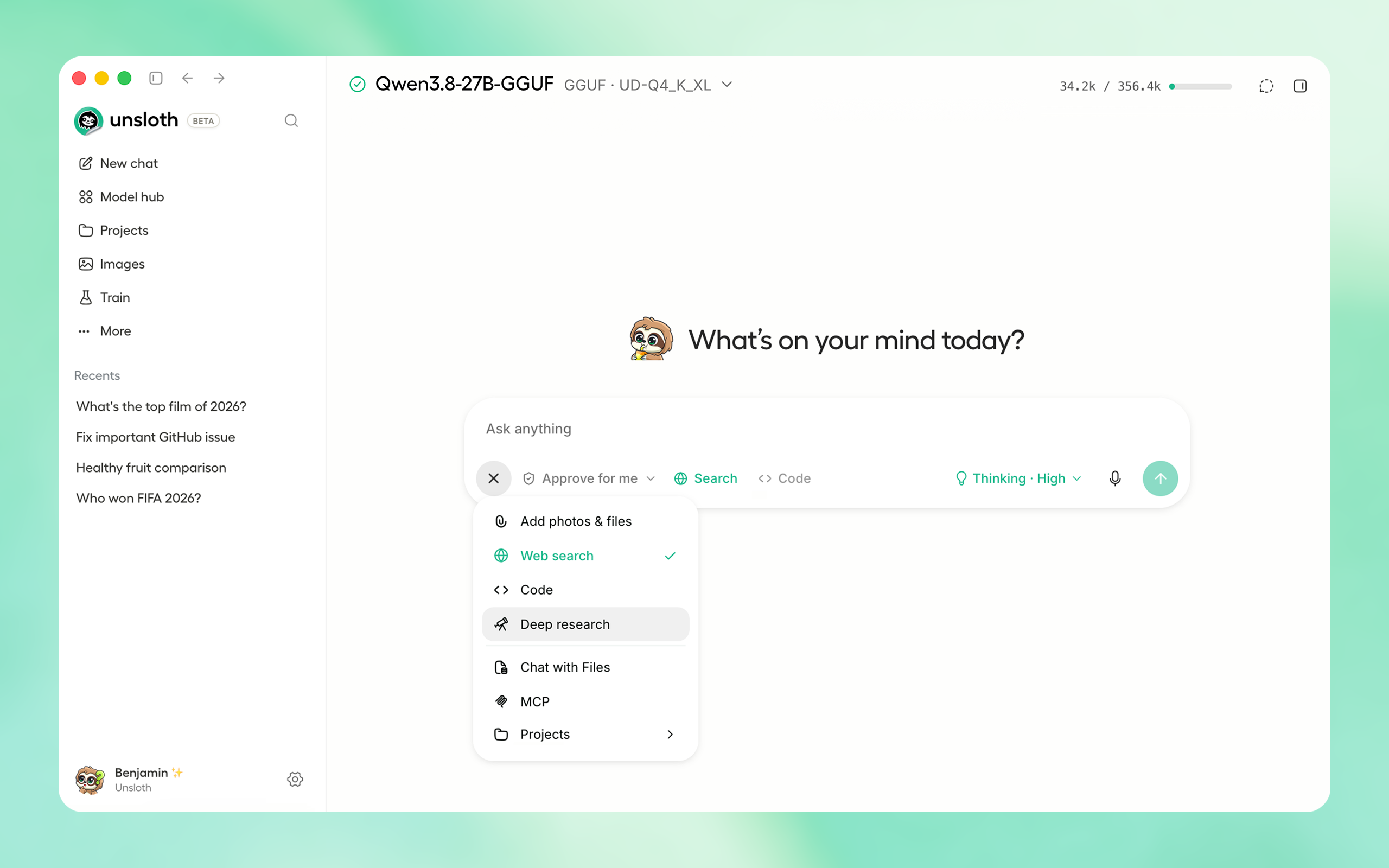
⚡ Get started
Download the native Unsloth Desktop app for your operating system:
| Platform | Link |
| Windows | Download |
| macOS | Download |
| Linux / Ubuntu (deb) | Download |
| Linux / Ubuntu (ARM64) (deb) | Download |
| Linux (AppImage) | Download |
| Windows (ARM64) | Download |
Download from Unsloth or GitHub Releases.
Or if you prefer to install manually:
macOS, Linux, WSL:
curl -fsSL https://unsloth.ai/install.sh | sh
Windows:
irm https://unsloth.ai/install.ps1 | iex
Docker:
The Unsloth Docker image unsloth/unsloth is available on Docker. Read guide.
Homebrew:
brew install --cask unsloth
Winget (Windows):
winget install --id UnslothAI.Unsloth -e
Community:
⭐ Features
Unsloth works on Windows, Linux, WSL and macOS. We support Multi GPU setups, NVIDIA, AMD, Intel GPUs, CPUs and the Vulkan backend.
Run & Build with AI
- Run and train LLMs, MLX, GGUF, diffusion, decision, embedding, audio models: Qwen3.8, GLM-5.3-Flash, Kimi K3, Qwen-Image-2.1, MiniMax-H3, DeepSeek-V4, Gemma 4.
- Agents & Tools: Use local models with Claude Code, Codex, and MCP, including tool calling and code execution.
- Search & RAG: Use private and unlimited web search, deep research, auto-compaction (rolling context window) and RAG.
- Image and video: Run and train image and video diffusion or multimodal models
- Remote & LAN: Access your local models from any device on LAN or remotely through secure Cloudflare HTTPS.
- Connect: Serve models through an OpenAI compatible API. Also connect your ChatGPT/Codex subscription and cloud providers
Train & Deploy
- Fine-tuning: Train LLMs, diffusion, decision, TTS, and embedding models 2× faster with 70% less VRAM with no accuracy loss
- Complete support: Supports reinforcement learning, LoRA, QLoRA, full fine tuning, pretraining, RL, GRPO, DPO, and FP8.
- Export & Deploy: Export or Deploy models including GGUF, NVFP4, FP8 and more formats.
- Datasets: Build datasets from PDFs, CSVs, DOCX files, and more with Data Recipes.
🚀 Unsloth Start
Unsloth Start connects Claude Code, Codex and other agents to local models with one command.
unsloth start claude --model unsloth/Qwen3.8-27B-GGUF:UD-Q4_K_XL
| Agent | Command |
|---|---|
| Claude Code | unsloth start claude |
| OpenAI Codex | unsloth start codex |
| Visual Studio Code | unsloth start vscode |
| DeepSeek Harness | unsloth start dsh |
| OpenCode | unsloth start opencode |
| Hermes Agent | unsloth start hermes |
| Pi | unsloth start pi |
| OpenClaw | unsloth start openclaw |
📥 Install
Unsloth can be used in three ways: Unsloth Desktop, the desktop app; Unsloth Studio, the web UI; or Unsloth Core, the code based version.
Unsloth Desktop (recommended)
| Platform | Link |
| Windows | Download |
| macOS | Download |
| Linux / Ubuntu (deb) | Download |
| Linux / Ubuntu (ARM64) (deb) | Download |
| Linux (AppImage) | Download |
| Windows (ARM64) | Download |
Unsloth Studio (web UI)
macOS, Linux, WSL:
curl -fsSL https://unsloth.ai/install.sh | sh
Windows:
irm https://unsloth.ai/install.ps1 | iex
Homebrew:
brew install --cask unsloth
Docker
Use our Docker image unsloth/unsloth. On Linux and Mac, set up GPU access once with
curl -fsSL https://raw.githubusercontent.com/unslothai/unsloth/main/docker/install_nvidia_toolkit.sh -o install_nvidia_toolkit.sh && sudo -E bash install_nvidia_toolkit.sh
For Windows instructions and more information, read our Unsloth Docker Guide.
Linux / WSL (Bash):
# for a public Cloudflare HTTPS link: use  -e UNSLOTH_STUDIO_SECURE=1  instead of -p 8000:8000, and  -p 127.0.0.1:8888:8888  instead of -p 8888:8888
docker run -d --name unsloth --gpus all --ipc=host \
  -p 8000:8000 -p 8888:8888 \
  -v "$PWD":/workspace/host \
  -v unsloth-workspace:/workspace \
  -v "$HOME/.cache/huggingface":/workspace/.cache/huggingface \
  -v unsloth-studio:/opt/unsloth-studio \
  unsloth/unsloth && docker logs -f unsloth
See Docker docs for more information. For notebooks only, use the unsloth/unsloth:core tag; all tags and options are on Docker Hub.
For AMD there is a separate image: unsloth/unsloth-rocm.
Launch
unsloth studio
HTTP Secure Deployment
unsloth studio --secure
Remote HTTPS & LAN Access
Server-side tools are on by default - so be careful! Keep your password safe, or use --disable-tools when exposing Unsloth.
Global HTTPS Access: Creates a free Cloudflare link that serves Unsloth - you can access the link globally (even on your phone!)
unsloth studio --secure
-H 0.0.0.0 and different ports also work:
unsloth studio -H 0.0.0.0 -p 8888
LAN Access (home network): Settings > API keys > LAN access
Password management & headless starts
Exposing Unsloth (--secure, --cloudflare, or a non-loopback -H) asks once at the terminal for a new admin password. Ctrl+C there aborts the launch rather than exposing the auto-generated one; set a password non-interactively instead, or use -H 127.0.0.1 to stay off the network.
Headless starts:
UNSLOTH_STUDIO_PASSWORD='your-strong-password' unsloth studio --secure # via env var
Reset your password:
unsloth studio reset-password
Developer, Nightly, Uninstall
To see developer, nightly and uninstallation etc. instructions, see advanced installation.
Unsloth Core (code-based)
Linux, WSL:
curl -LsSf https://astral.sh/uv/install.sh | sh
uv venv unsloth_env --python 3.13
source unsloth_env/bin/activate
uv pip install unsloth --torch-backend=auto
Windows:
winget install -e --id Python.Python.3.13
winget install --id=astral-sh.uv  -e
uv venv unsloth_env --python 3.13
.\unsloth_env\Scripts\activate
uv pip install torchao
uv pip install unsloth --torch-backend=auto
Install torchao first on Windows: --torch-backend looks for it only on the PyTorch index, which has no recent Windows torchao, so a one-step install silently resolves an old Unsloth.
AMD, Intel, DGX Spark, Blackwell:
See our Blackwell guide and DGX Spark guide.
To install Unsloth on AMD and Intel GPUs, follow our AMD Guide and Intel Guide.
📒 Free Notebooks
Train for free with our notebooks. Read our guide. Add dataset, run, then deploy your trained model.
| Model | Free Notebooks | Performance | Memory use |
|---|---|---|---|
| Unsloth Studio | ▶️ Start for free | ||
| Decision model (Qwen3.5-4B) | ▶️ Start for free | 1.5x faster | 60% less |
| Gemma 4 (E2B) | ▶️ Start for free | 1.5x faster | 50% less |
| Qwen3.5 (4B) | ▶️ Start for free | 1.5x faster | 60% less |
| gpt-oss (20B) | ▶️ Start for free | 2x faster | 70% less |
| Qwen3.5 GSPO | ▶️ Start for free | 2x faster | 70% less |
| gpt-oss (20B): GRPO | ▶️ Start for free | 2x faster | 80% less |
| Qwen3: Advanced GRPO | ▶️ Start for free | 2x faster | 70% less |
| embeddinggemma (300M) | ▶️ Start for free | 2x faster | 20% less |
| Llama 3.1 (8B) Alpaca | ▶️ Start for free | 2x faster | 70% less |
| Llama 3.2 Conversational | ▶️ Start for free | 2x faster | 70% less |
| Orpheus-TTS (3B) | ▶️ Start for free | 1.5x faster | 50% less |
- See all our notebooks for: Kaggle, GRPO, TTS, embedding & Vision
- See all our models and all our notebooks
- See detailed documentation for Unsloth here
📥 Advanced Installation
The below advanced instructions are for Unsloth Studio. For Unsloth Core advanced installation, view our docs.
Developer / Nightly / Experimental installs: macOS, Linux, WSL:
The developer install builds from the main branch, which is the latest (nightly) source.
git clone https://github.com/unslothai/unsloth
cd unsloth
./install.sh --local
unsloth studio -p 8888
To install into an isolated location, set UNSLOTH_STUDIO_HOME:
UNSLOTH_STUDIO_HOME="$PWD/.studio" ./install.sh --local
UNSLOTH_STUDIO_HOME="$PWD/.studio" unsloth studio -p 8888
Then to update:
cd unsloth && git pull
./install.sh --local
unsloth studio -p 8888
Developer / Nightly / Experimental installs: Windows PowerShell:
The developer install builds from the main branch, which is the latest (nightly) source.
git clone https://github.com/unslothai/unsloth.git
cd unsloth
Set-ExecutionPolicy -Scope Process -ExecutionPolicy RemoteSigned
.\install.ps1 --local
unsloth studio -p 8888
To install into an isolated location, set UNSLOTH_STUDIO_HOME:
$env:UNSLOTH_STUDIO_HOME="$PWD\.studio"; .\install.ps1 --local
$env:UNSLOTH_STUDIO_HOME="$PWD\.studio"; unsloth studio -p 8888
Then to update:
cd unsloth; git pull
.\install.ps1 --local
unsloth studio -p 8888
Advanced launch options
Skip PyTorch (GGUF-only mode):
curl -fsSL https://unsloth.ai/install.sh | UNSLOTH_NO_TORCH=1 sh
$env:UNSLOTH_NO_TORCH=1; irm https://unsloth.ai/install.ps1 | iex
Skip the post-install prompt that starts Unsloth (useful for automated installs):
curl -fsSL https://unsloth.ai/install.sh | UNSLOTH_SKIP_AUTOSTART=1 sh
$env:UNSLOTH_SKIP_AUTOSTART=1; irm https://unsloth.ai/install.ps1 | iex
Keep the install-time package cache under the Unsloth Studio directory instead of reusing an existing uv cache. Downloads are slower the first time, and an explicit UV_CACHE_DIR still wins over this:
curl -fsSL https://unsloth.ai/install.sh | UNSLOTH_ISOLATE_UV_CACHE=1 sh
$env:UNSLOTH_ISOLATE_UV_CACHE=1; irm https://unsloth.ai/install.ps1 | iex
For a local run the flag is --isolated-uv-cache:
./install.sh --local --isolated-uv-cache
.\install.ps1 --local --isolated-uv-cache
Discard the previous environment immediately when reinstalling, instead of keeping a copy until the new one works. A reinstall normally holds both at once, so it needs room for two; this needs room for one, at the cost of not being able to undo a failed install:
curl -fsSL https://unsloth.ai/install.sh | UNSLOTH_INSTALL_NO_ROLLBACK=1 sh
$env:UNSLOTH_INSTALL_NO_ROLLBACK=1; irm https://unsloth.ai/install.ps1 | iex
For a local run the flag is --no-rollback:
./install.sh --local --no-rollback
.\install.ps1 --local --no-rollback
Pinning the Python version:
curl -fsSL https://unsloth.ai/install.sh | UNSLOTH_PYTHON=3.12 sh
$env:UNSLOTH_PYTHON='3.12'; irm https://unsloth.ai/install.ps1 | iex
Install to a custom location with UNSLOTH_STUDIO_HOME:
curl -fsSL https://unsloth.ai/install.sh | UNSLOTH_STUDIO_HOME=/abs/path sh
$env:UNSLOTH_STUDIO_HOME='C:\path'; irm https://unsloth.ai/install.ps1 | iex
Point the frontend build at a corporate npm mirror/proxy with UNSLOTH_NPM_REGISTRY:
UNSLOTH_NPM_REGISTRY=https://artifactory.example.com/api/npm/npm/ ./install.sh --local
$env:UNSLOTH_NPM_REGISTRY='https://artifactory.example.com/api/npm/npm/'; .\install.ps1 --local
Cap Unsloth's native CPU thread pools on high-core hosts: UNSLOTH_CPU_THREADS=8 unsloth studio -p 8888.
Vulkan, custom llama.cpp backends:
You can force the backend during installation:
export UNSLOTH_LLAMA_CPP_BACKEND=vulkan   # or cpu, cuda, rocm, auto
curl -fsSL https://unsloth.ai/install.sh | sh
$env:UNSLOTH_LLAMA_CPP_BACKEND="vulkan"   # or cpu, cuda, rocm, auto
irm https://unsloth.ai/install.ps1 | iex
audio.cpp audio engine:
Setup also installs audio.cpp (prebuilt by unslothai/audio.cpp), which runs the audio.cpp speech, music and speech-to-text models on the Audio page, in Voice settings and behind /v1/audio/*. It is optional and never blocks setup:
UNSLOTH_SKIP_AUDIO_CPP_INSTALL=1skips it.UNSLOTH_AUDIO_CPP_ACCELERATOR=cpu(orcuda,vulkan,metal) picks the bundle instead of auto-detecting.AUDIOCPP_SERVER_PATH=/path/to/audiocpp_serveruses your own build.
Uninstall
MacOS, WSL, Linux: curl -fsSL https://raw.githubusercontent.com/unslothai/unsloth/main/scripts/uninstall.sh | sh
Windows (PowerShell): irm https://raw.githubusercontent.com/unslothai/unsloth/main/scripts/uninstall.ps1 | iex
For more info, see our docs.
Deleting model files
You can delete old model files either from the bin icon in model search or by removing the relevant cached model folder from the default Hugging Face cache directory. By default, HF uses:
MacOS, Linux, WSL: ~/.cache/huggingface/hub/
Windows: %USERPROFILE%\.cache\huggingface\hub\
💚 Community and Links
| Type | Links |
|---|---|
 Discord Discord |
Join Discord server |
 r/unsloth Reddit r/unsloth Reddit |
Join Reddit community |
| 📚 Documentation & Wiki | Read Our Docs |
_logo_late_2025.svg) Twitter (aka X) Twitter (aka X) |
Follow us on X |
| 🔮 Our Models | Unsloth Catalog |
| ✍️ Blog | Read our Blogs |
Citation
You can cite the Unsloth repo as follows:
@software{unsloth,
  author = {Daniel Han, Michael Han and Unsloth team},
  title = {Unsloth},
  url = {https://github.com/unslothai/unsloth},
  year = {2023}
}
If you trained a model with 🦥Unsloth, you can use this cool sticker! 
License
Unsloth uses a dual-licensing model of Apache 2.0 and AGPL-3.0. The core Unsloth package remains licensed under Apache 2.0, while certain optional components, such as the Unsloth Studio UI are licensed under the open-source license AGPL-3.0.
This structure helps support ongoing Unsloth development while keeping the project open source and enabling the broader ecosystem to continue growing.
Thank You to
- The llama.cpp library that lets users run and save models with Unsloth
- The Hugging Face team and their libraries: transformers and TRL
- The Pytorch and Torch AO team for their contributions
- NVIDIA for their NeMo DataDesigner library and their contributions
- And of course for every single person who has contributed or has used Unsloth!