 36050777f9
Liseur ships as an APK on GitHub releases and through F-Droid. Play is a third channel, and the point of this change is that it is the least load-bearing of the three: the tag that publishes a release now also builds an app bundle and pushes it to internal testing, and every part of that is arranged so it cannot take the other two down with it. Nothing about the APK path moves. F-Droid's recipe builds assembleRelease and never sees fastlane/Fastfile, no Gradle publishing plugin is applied, and bundleRelease is an additional output rather than a replacement. The workflow step skips itself when the service account secret is absent, so forks still cut releases, and is continue-on-error so a rejected upload is not what fails one. Only the changelog is pushed from here. The store listing stays in the console, because Play holds declarations that no file in this repository describes -- data safety, content rating, target audience -- and an accidental metadata push is a listing change under review. Play also requires a privacy policy at a public URL, so docs/PRIVACY.md says what the app actually does: no collection, no trackers, network only to the book server you enter and to a dictionary lookup that is off until you turn it on. GitHub Pages serves it from main /docs, which makes it a document that changes in a commit rather than in a console text box. The upload credential is the existing account-level service account, already in pass; hack/release --sync-secrets carries it into the release environment alongside the signing key. |
||
|---|---|---|
| .github | ||
| app | ||
| docs | ||
| fastlane | ||
| gradle | ||
| hack | ||
| tmp | ||
| .gitignore | ||
| .pre-commit-config.yaml | ||
| AGENTS.md | ||
| build.gradle.kts | ||
| CLAUDE.md | ||
| DEVELOPER.md | ||
| gradle.properties | ||
| gradlew | ||
| gradlew.bat | ||
| LICENSE | ||
| Makefile | ||
| README.md | ||
| settings.gradle.kts | ||
Liseur

An open-source ebook reader for Android and a calibre-web / Komga / liseur-sync client: EPUBs on your phone, in sync with your own book server, for people whose idea of a great evening is a warm blanket and a 900-page book.
 |
 |
 |
 |
| The shelf, sorted by what you are currently reading. | Distraction-free page with notes and bookmarks. | Reading progress, chapter scrubber, and time remaining. | Themes, open typefaces, spacing, and brightness. |
 |
 |
 |
 |
| Full-screen table of contents for easy navigation. | A personal notebook of highlights, exportable to Markdown. | In-book search with context snippets. | Instant word definitions without losing your place. |
 |
 |
 |
 |
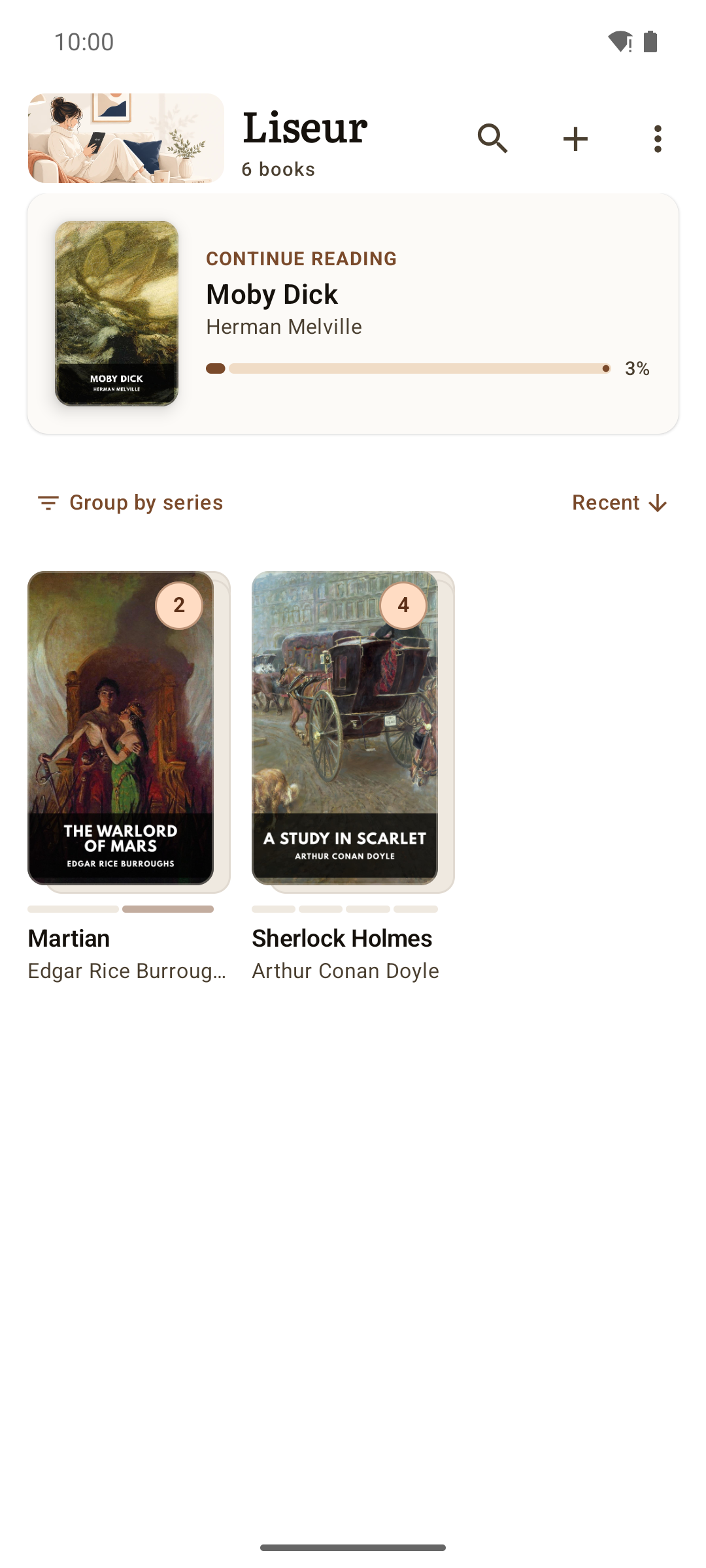
| Series grouped into compact shelf stacks. | Reading order, progress, and missing volumes at a glance. | Connect to calibre-web, Komga or liseur-sync in moments. | Dark reading theme, independent of system settings. |
Screenshots use Standard Ebooks editions (public domain).
About Liseur
Liseur is designed to get out of the way and let you read. Pages open cleanly from edge to edge with the Readium engine, set in open typefaces like Literata, Vollkorn, Atkinson Hyperlegible, and Inter, or whatever quirky typography the publisher insisted on. Four dedicated reading themes (Light, Sepia, Dark, and true OLED Black) let you settle into a story at 2 a.m. without being blinded by your phone. Margins, line spacing, brightness, and page turns stay quietly out of your way. Prefer one long scroll to turning pages? Switch it on for the whole library, or for the one book that wants it, and keep scrolling past the end of a chapter to fall into the next one.
A discreet footer shows the time remaining in the chapter (just enough to convince yourself that one more chapter won't hurt), while highlights, margin notes, bookmarks, and instant dictionary lookups remain right under your fingers when you stumble upon a word you pretend to know. Footnotes open as a small card over the page rather than throwing you to the back of the book, so an author's aside costs you nothing more than a tap — and when a note is long enough to deserve the full page, "Go to note" takes you there and leaves a way back.
Your library gathers onto a single shelf, whether your books live in messy folders on your phone or on a self-hosted calibre-web, Komga or liseur-sync server. Books that belong to a series politely group into compact stacks that track your reading order, your progress, and the missing volumes you still need to hunt down. When you reach the final page of a novel, the next volume is already sitting there, gently enabling your binge-reading habits.
When you switch between devices, you have the choice to have your place travel with you across your devices. Two-way synchronization with calibre-web, Komga and liseur-sync keeps your progress aligned — down to the exact sentence on Komga and liseur-sync, so you never have to play the guessing game of where you were. liseur-sync goes one further: standalone EPUB files that never came from a catalog sync their position too, matched by the file itself. Its books come from folders it watches on the server, so anything you drop there shows up on the shelf.
Everything runs privately and without distraction. There are no trackers, no analytics, no ads, and no attempts to sell you a monthly subscription for books you already own. Liseur only talks to the book servers and dictionary sources you choose to add. The privacy policy spells out exactly what that means.
Install
Related Projects
- liseur-desktop: Desktop version of Liseur
- liseur-sync: Lightweight self-hosted library and sync server — watched folders, browse, download, positions and reading stats
Development
See DEVELOPER.md for build instructions and architecture notes.
What each supported server exposes, what is implemented against it, and
why the remaining gaps are or are not fixable is in
docs/SERVER_CAPABILITIES.md.
What's in a name?
Liseur ([li.zœʁ], lee-ZUR) is the French word for an avid reader or book lover. It sounds dignified just like the English word leisure, which is exactly what you should be doing when you curl up with a good book.
Here is a painting of Pierre-August Renoir portraying C.Monet as "Le liseur"
.jpg)
Author

Chmouel Boudjnah
- Fediverse - <@chmouel@chmouel.com>
- Twitter - <@chmouel>
- Blog - <https://blog.chmouel.com>
Licence
MIT. Bundled fonts are under the SIL Open Font License.