mirror of
https://github.com/NeuralNomadsAI/CodeNomad.git
synced 2026-11-16 13:11:03 +00:00
24 commits
| Author | SHA1 | Message | Date | |
|---|---|---|---|---|
 Pascal André |
25e75fd3f2
|
fix(ui): keep independent views in duplicated session tabs (#1510)
## Summary I make duplicated project tabs on the same session keep independent views (backlog item 19). When the same project was open twice with the same session selected, enabling the web preview in one tab forced it in the other, because the preview state was keyed by folder + session. The Missions reader was keyed by folder, and the right-panel tab and Files mode were restored from global keys. I now attach what each tab shows to its own tab occurrence, while messages, execution and session data stay shared. ## User-visible changes - I keep the web preview per tab occurrence and session: mode, URL, back/forward history, in-flight navigation and device emulation no longer follow the other tab. Cookies and site storage stay shared through the preview profile. - I scope the Missions reader, selected mission/task/schedule, expanded tree and reader disclosures to the tab occurrence. Mission data and read acknowledgements stay shared. - I restore the right-panel tab and Files mode (Workspace/Changes/Commits) per tab occurrence; the global values remain the defaults for new tabs. The browsed worktree and Files filters are independent per tab while CodeNomad runs, without being restored after a restart. Widths, palette, locale, rendering and panel customization stay shared preferences. - I keep one tab on older history while the other follows the latest messages; both receive the same messages and execution updates. - Closing one tab releases only its own preview resources and saved view state; the other tab and the native session keep working. - After a restart, each restored tab gets its own view back, but I never load a saved page until it is explicitly reopened. A newly opened tab starts on the conversation. ## Approach and edge cases I centralize what a tab shows over its session in `stores/session-surface.ts`: one typed foreground choice per tab occurrence (conversation, web preview, file reader or Missions reader), with activation intents so a newer gesture always wins over a delayed one. Session binding is explicit per surface, so schedule and playbook readers work without a conversation. The web preview, file and Missions features keep their own resources (preview tokens, guests and history; file drafts; Mission data and selection) and plug into this single arbitration instead of closing each other. I reuse the existing `instance:<instanceId>` tab identity and add a per-tab restorable view-state envelope (`stores/tab-view-state*.ts`) carried by each restorable tab descriptor, wired through capture, the partitioned client-state codecs, partial-restore preservation and hydration, so state re-attaches to the re-created instance id. Field updates preserve untouched live branches, so an unrelated update never cancels an in-flight Missions read, and asynchronous Missions navigation yields to any newer surface gesture, including browser navigation. Plain-browser and Remote Control clients persist the same envelope through bounded local storage. I migrate legacy folder + session preview entries to the matching restored descriptors deterministically, per session, preferring an exact session entry over the project-wide fallback, and remove them only after the new snapshot is published. The real `sessionId` remains the only native authority; the occurrence key is presentation-only. URL rules, sandboxing, guest ownership and lease/generation fences are unchanged. Automation targeting is explicit: `open` targets the active open tab that owns the session, else the unique owner, else it refuses; the chosen occurrence is kept for the whole asynchronous open and closing it never reroutes. Page actions keep the existing native rule of exactly one visible eligible preview, refusing ambiguity without fallback. Each tab occurrence has a gesture generation. User gestures (clicks, shortcuts, commands, links, new session, delete, fork, automation opens routed to the tab) advance it: `beginGesture(ctx)` captures the generation before any await and exposes `current()`, and `applySurface(ctx, surface, gesture?)` applies a synchronous gesture or adopts a captured one only while it is still current; selection actions accept the same gesture. An older asynchronous gesture (Mission actor or schedule navigation, task links, new session creation, history-search navigation, explicit Git actions, browser opens) therefore never overrides a newer one, while keeping its durable effects (a created session stays created; a rejected preview releases its own token). Passive updates (Git status, Mission inventory and passage reconciliation, restoration and hydration, session/worktree changes, preview location/history notifications) apply immediately against current state, never advance the generation and never cancel a pending gesture. They keep their own guards at the moment they run: a file reader closes only when a loaded status inventory shows the file is gone, a Mission reader is cleared only when its Mission is actually missing, and session deletion reconciles the selected parent and child at once. I extract the shared active-session signal into `stores/session-selection-state.ts`, keeping session actions, catalog refresh and restoration authority in `stores/session-state.ts` and their UI-effect dependencies outside the view-state import graph. I add `tab-view-state.test.ts`, `session-surface.test.ts` and `app-session-workspace-hydration.test.ts` to the explicit CI unit-test lists. I bound late-response fences to in-flight operations and open occurrences, so repeated open/close cycles retain nothing (1,000-cycle regression test), while a late success or error for a closed tab still publishes nothing. ## Validation I rebased the seven commits onto `dev` at ` |
||
|
Pascal André
|
bb207cfcc6
|
chore(ui): trim interface copy and multilingual help (#1536)
Trim internal implementation commentary and routine-failure explanations from the interface and public help in all ten languages. Areas: Settings, Missions, providers and plugins, projects and remote access, transcript controls and the 28 help pages. Keep security and irreversible-action warnings, accessible names, scope boundaries and facts needed to act. Preserve current dev behavior and labels; the legacy OpenCode replacement confirmation now identifies its exact target. Validated with UI typecheck, ten-locale key and placeholder checks, help tests, unit contracts and affected browser tests. |
||
|
Pascal André
|
c0ea1dd6e9
|
feat(integrations): manage integrations from their Plugins rows (#1492)
Some checks failed
Publish help / build (push) Waiting to run
Publish help / deploy (push) Blocked by required conditions
Download Caches / seed (macos-15-intel) (push) Has been cancelled
Download Caches / seed (macos-26) (push) Has been cancelled
Download Caches / seed (ubuntu-24.04) (push) Has been cancelled
Download Caches / seed (windows-2025) (push) Has been cancelled
Manage each recognized OpenCode integration from its Status → Plugins row. Remove the separate per-integration sections and manual attachment picker; integrations attach conversations through their native first-use contract. Show catalogue names, package versions, integration-accent switches, conversation binding and application warnings. The chain button attaches to a compatible open document or detaches the captured conversation. Revoke pending enumeration and choices on navigation, invalidation, reconnect and disposal. Keep guarded application installation and one-shot native actions alongside existing package controls. Reads remain demand-driven and refresh on native events and reconnects. Explicit refresh also retries demanded bindings for the exact displayed conversation and Location. Preserve integration display and native actions for inherited, virtual and runtime-only plugins through an unambiguous runtime identity, separately from writable-source mutation authority. Keep revision checks, consent revocation and uncertain-outcome handling; never replay a mutation automatically. Update help and UI strings in ten locales, documentation and captures. Cover binding recovery, read-only origins, activation/removal scope and native-action guards through unit and real-panel browser regressions. Qualify the projected runtime identities with the isolated official daemon. |
||
|
Pascal André
|
b937256378
|
fix(memory): hide the native memory tool while agent memory is disabled (#1479)
Closes #1477 ## Why With agent memory off, `codenomad_memory` was still registered for every session (subagents included), so every request carried a tool that could only fail with "Memory is disabled". ## What changes - The backend writes `server.memoryEnabled` into its memory presence leases (`{"version":1,"memory":true}` or empty) at startup and on each server config change (`opencode/memory/preference.ts`), the same lease-request mechanism as the Design agent. - The plugin registers its tool transform only while a live lease requests memory, rereads the request at each presence interval and calls `ctx.tool.reload()` only on a change. Running sessions gain or lose the tool within seconds, with no restart. - The prompt hook stays registered, so disabling memory still clears stale `codenomad.memory` instructions; execution still rejects disabled use. Runtimes without `ctx.tool.reload` keep the tool registered. - The lease request format is shared with Design (`opencode/lease-request.ts`) and produces identical output. ## Validation - Server typecheck, `test:help`, and unit tests for the memory plugin, the preference sync, Design activation and the memory service (37 pass). - `scripts/test-memory-tool-native.mjs` against a private OpenCode 2.2.7 daemon: the tool is absent while memory is disabled, appears when enabled, disappears on disable and comes back on re-enable. - Help updated in all ten locales. |
||
|
Pascal André
|
ff0340d610
|
fix(status): fold customization sections and align token rows with messages (#1418)
Some checks are pending
Download Caches / seed (macos-15-intel) (push) Waiting to run
Download Caches / seed (macos-26) (push) Waiting to run
Download Caches / seed (ubuntu-24.04) (push) Waiting to run
Download Caches / seed (windows-2025) (push) Waiting to run
Publish help / build (push) Waiting to run
Publish help / deploy (push) Blocked by required conditions
## Summary - Replace Status's disabled visibility checkbox in **Customize right panel** with a chevron. It folds only the section choices, preserving actual visibility and ordering. The group starts expanded when the menu opens. - Put Status first by default. Existing saved tab orders still take precedence. - Give Status Tokens the same metric chips as messages through a shared renderer and stylesheet. Collapsed: input/output/cost on the header line. Expanded: reasoning joins them on that line, chips wrap when narrow, and descendant-inclusive totals remain underneath. - Preserve existing subscription labels, accounting and independent message-token visibility. No explanatory UI prose is added. 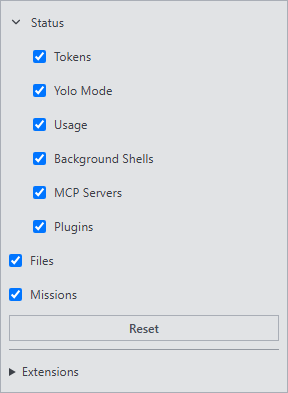 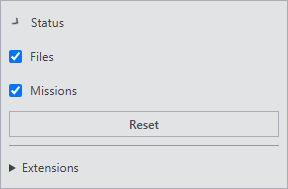  Captures use the real Solid components and stylesheet with synthetic fixture data. Image assets are absent from the final tree. ## Validation - 46 browser tests: Status/customization, Status tokens, message usage, integration Status sections and panel extensions. - 12 registry/manifest unit tests. - UI typecheck and production build. - 31 multilingual help tests, validating 28 pages in all ten locales. - New regressions cover default/saved ordering, chevron click/Enter/Space without visibility writes, shared chip styling, 220px LTR/RTL wrapping, live values and subscription/descendant totals. Shell and transcript conventions plus all ten Settings help pages are updated. |
||
|
Pascal André
|
339ecf945c
|
feat(help): open localized guide sections from contextual info icons (#1404)
## Summary
- Extend the existing `SettingsInfoTip` with `help?: { page: string;
anchor?: string }`; retain short hover/focus explanations and open
matching localized help externally on click, Enter or touch.
- Reuse `helpUrl` and `openExternalUrl`, guard page/anchor syntax,
preserve containing controls and disclosures, and show the existing
localized help error without replaying failed actions.
- Carry destinations through existing choice rows, behavior settings and
core Status metadata; document the reusable pattern and update the
settings guide in all ten languages.
## Linked inventory
- General: automatic subsession expansion, keep-awake, Memory, Tidy up
and memory-review warning.
- Advanced: whitespace-only changes and session environment variables.
- OpenCode: startup launch.
- Providers: image generation and image storage.
- Notifications: On screen, History and System column tips.
- Speech: provider, separate providers, shared/input/output base URLs,
playback mode, output format, playback test and prompt voice input.
- Status: Tokens, Yolo mode, Usage, Background Shells, MCP and Plugins.
Mission creation/scheduling/depth/preferences belong to the separate
form change, which can use the shared prop directly. Dynamic mission
budget, attention and diagnostics tips retain their information-only
purpose. Existing `SettingsInfoLink` and integration `InfoPopoverButton`
explanations retain their actionable/runtime-specific popovers; sidebar
Info navigation and Info-card heading icons keep their distinct purpose.
## Validation
- `npm ci` in the isolated checkout.
- UI typecheck.
- URL/section checks: every literal contextual destination resolves in
all ten locales, including `zh-Hans`.
- Behavior and right-panel registry tests: 14 passed.
- Full help suite: 31 passed, validating 28 pages × 10 locales.
- Real Solid browser gesture and relevant settings regressions: 56
passed (new shared-tip cases, startup launch, General/appearance,
Memory, notifications and help-command routes). All eight new
gesture/native-route cases pass.
- The fixture-wiring audit reports two existing WebKit fixtures without
the required exemption/navigation-budget wiring; those files and the
audit inputs are unchanged from `origin/dev`.
## Scope
No Mission form/tree edits, new dependencies, URL registry, plugin
extension point or duplicated info component. Visible explanations and
opener errors reuse existing translations.
## Independent review and CI
Round 1 found a translation-readiness race in the browser test. The test
now waits for the real localized info-link label before activating it.
Round 2: **No findings**.
Current `origin/dev` is merged. CI has baseline failures in the
unchanged binary-build ordering expectation and Cargo lockfile; the unit
failure reproduces locally and the affected inputs match `origin/dev`.
The existing fixture-wiring audit likewise reports only unchanged WebKit
files. These are tracked in the PR discussion separately from
contextual-help validation. Additional platform jobs remain
queued/running; admin merge is explicitly authorized for this change.
## Real component capture

|
||
|
Pascal André
|
0829c7cfe6
|
feat(memory): add opt-in persistent agent memory (#1313)
## Why Let agents retain useful facts and preferences across conversations without relying on hand-written user context or sending memory to a remote service. Memory is opt-in and belongs to the connected CodeNomad configuration. ## User-visible behavior - Add **Memory** under **Preferences → General**, also available in embedded Settings; it is **disabled by default**. - Provide **About you** (60 entries) and **Project** (200 entries). The server derives project identity from the normalized Git remote, with a canonical local-path fallback shared by worktrees. - Expose `codenomad_memory` for listing, reading, saving and forgetting agent-written entries. Each accepted save or deletion creates a local Git commit. - Synchronize the session-local `codenomad.memory` instructions, including native children: recording rules plus bounded title/type lists, with read-before-action and verification guidance. - Review New/Modified badges, edit entries directly, confirm Forget, resolve stale revisions, and inspect suspicious entries excluded from agent use. - **Tidy up** (**Ranger** in French) opens a project-bound session to verify and merge the selected scope, preserving unverifiable claims and external references. - Existing external agent memory stays under its own management; agents can store a literal Reference to it. No automatic import or remote synchronization. ## Approach and edge cases - Server-owned Markdown entries in the configuration's private Git repository, atomic file replacement, process-generation-fenced locking and recoverable local commit transactions. - Shared validation contracts, 60-character titles and 2,000-character bodies, multilingual duplicate matching and injection heuristics across all ten interface languages. Flagged entries remain reviewable and count toward capacity, but are rechecked and excluded from agent projections. - Missing folders are empty; malformed/unreadable scopes return explicit errors. Capacity errors ask the agent to merge or remove entries. Revision checks preserve concurrent edits and drafts. - Bundle the native memory plugin through the existing native-plugin build/provisioning lifecycle, including the managed-plugin descriptor used by the current dev branch. - Authorize session/project ownership and enablement at mutation time. Optional instruction capability absence stays silent. Ordinary sends continue during optional memory outages; stale instruction cleanup is best-effort and memory claims must still be verified. - Rebased onto `origin/dev`; preserved its graceful shutdown lifecycle, nested-worktree error handling and translated keep-awake help alongside memory. ## Documentation - Updated `docs/help/en/settings.md` and all nine translations with activation, scopes, editing, forgetting/history retention, warnings, Tidy up, external references and local-only storage. - Added the agent-memory developer contract and updated the related settings, project, plugin and OpenCode integration guidance. ## Validation - Focused memory/server suite, including `packages/server/src/memory/integration.test.ts`, native memory tool units, session memory context, project/forge identity, standalone authenticated bridge, nested-worktree and Git-probe regressions: **115 passed, 0 failed, 1 skipped** (real WSL qualification is opt-in). - Admission, plugin installation/lifecycle/provisioning, managed-plugin recognition, graceful shutdown, cleanup and shared UI contract regressions: **127 passed**. - `npm run typecheck` (remote tunnel, UI and Electron): **passed**. - `npm run typecheck --workspace @neuralnomads/codenomad`: **passed**. - Memory and Preferences browser tests (`agent-memory`, `preferences-window`, `preferences-startup`, `preferences-startup-state`, serial): **38 passed**. - `npm run test:help`: **31 passed**, including all ten locales' structure and links. - `npm run build:memory --workspace @neuralnomads/codenomad` plus native-plugin build, managed-plugin and desktop resource checks: **36 passed**. Verified the built memory bundle's first-line plugin descriptor. - `git diff --check`: **passed**; checkout clean and branch contains the current fetched `origin/dev` before its first push. ## Known test noise `missions/mission-local-sources.test.ts:73` also fails on `origin/dev`. Four intermittent full-suite failures outside memory are being compared with `origin/dev`; these are separate from the focused post-rebase checks above. |
||
|
Pascal André
|
c29b885adc
|
feat(settings): keep the computer awake while CodeNomad is running (#1307)
CodeNomad blocked system sleep only while a session was working, so a machine left with CodeNomad open between tasks could still go to sleep. Settings > General gains "Keep the computer awake while CodeNomad is running", off by default, with its explanation behind the (i) info tip. When on, a local application window holds the existing native wake lock while it is open, minimized included, even with no session; the display can still turn off. When off, the per-session rule applies unchanged. The preference is persisted as ui.settings.keepComputerAwake through the existing config path, with no server change. A pure shouldAppHoldWakeLock() counts it only in local windows: remote windows read the remote server's config, so Electron remote windows keep holding the lock only for their own qualifying sessions, and Tauri remote windows and the Preferences window never request it. The row is shown in local desktop windows and Preferences, and hidden in a web browser and remote views. A failed save rejects the setter so the row never shows an unpersisted value. The Tauri keep-awake reason reported to the OS is now neutral. Labels ship in all 10 locales; dev-docs/SETTINGS.md, the wake-lock specification and the Settings help (English + 9 translations) describe the behavior. Validation: unit matrix (preference x eligible work x window context) and preference tests, the appearance browser test (hidden on web; default, keyboard info tip, (i) never toggles, persistence on and off after reload), UI typecheck and build, help tests, cargo check, and the full CI suite. |
||
|
Pascal André
|
fc1b9e72b2
|
feat(transcript): optional first/latest controls in the timeline corner (#1295)
General gains "Put the first/latest message arrows under the timeline", off by default. With it on and the timeline shown, the first/latest controls leave the transcript for the corner cell under the timeline, right of Send: small filled stop arrows in the accent colour, both always in place, the end the reader has reached faded and without hover highlight but still clickable. Otherwise (option off, timeline hidden, conversations under 420px) the floating controls stay. PromptInput renders the corner inside its footer and SessionView hands it to MessageSection as a portal mount, so it follows the composer when an open interruption dock scrolls the session stack. One view-scoped width sizes the corner and the footer reservation; touch layouts get two 32px targets. Two fixes keep the First control honest: the oldest window (the first ascending page) no longer stores the native boundary cursor as older history, and a viewport resize keeps a reader at offset 0 at the start. Validation: gatekeeper review approved with no remaining findings (geometry, accessibility tree, ten-locale help). Store and browser regression tests cover the cursor, the resize at the start, the General checkbox and its persistence, the corner geometry and fallbacks, header-windows and the Android short-keyboard dock. Help and SESSION_HISTORY_NAVIGATION.md are updated in all ten locales. |
||
|
Pascal André
|
e4b40d85fa
|
feat(integrations): ship native Status sections and catalogue installation (#1283)
Ship native integration Status sections and catalogue installation by integration ID, including the complete change from #1280. Keep plugin package management in Plugins, per-conversation attachment authority in Status, guarded installation, shared controls, persistent section customization and all ten UI/help locales.
Merge current origin/dev into the feature branch with an ordinary merge, preserving file-reader lifetime and the latest native browser fixture contracts. Resolve conflicts in instance-shell2.tsx, right-panel/core-runtime.tsx, automation-forms.test.ts and session-child-activity.test.ts without weakening assertions or deadlines.
ADMIN-FORCED MERGE AT THE HUMAN'S EXPLICIT REQUEST. The human accepts exactly these two remaining Missions browser failures for this merge:
- mission-schedule-list: fresh-read Start scenario, 15-second SSE setup timeout; reproduced on dev
|
||
 Ledracarnos |
091361d116
|
fix(ui): capture pointer while resizing side panels (#1233)
Resizing a docked side panel listened for mouse and touch moves on the whole document, so a drag that left the handle's narrow hit area could reach controls under the pointer and the handle lost its highlight. The handles now use local Pointer Events with pointer capture, like the composer's resize handle: the initiating primary pointer is captured on the handle, which keeps an .is-resizing highlight until release, cancellation, capture loss or its own removal; secondary buttons never start a drag, and touch-action: none keeps touch drags from scrolling. Each handle's cleanup stops only its own side's drag, so closing the opposite panel mid-drag does not interrupt it. The document-wide drag helper is removed. Width calculation, clamping, RTL, persistence and resize scheduling are unchanged. The help pages in all ten locales mention dragging a panel's inner edge to resize it. panel-resize.test.ts drives the real shell for both panels in LTR and RTL: capture and highlight outside the handle, release, cancellation, capture loss, handle removal, closing the opposite panel mid-drag, touch and a held secondary button. drawer-width, the help tests and the UI typecheck pass. |
||
|
Pascal André
|
248a4b3cd1
|
feat(status): show the session's /goal on one line above Tokens (#1228)
## Summary OpenCode's built-in `/goal <objective>` keeps a session working turn after turn until its reviewer judges the objective met, and pauses the goal on its own after a stop, a failed run, stalls, its round limit or a service restart. CodeNomad already listed `/goal` in the composer picker (it comes from `command.list`) but showed nothing of the goal itself. While the shown session has a goal, the **Status** tab now shows **one line above Tokens**: - a status badge: **Active**, **Paused** or **Complete**; - the objective on one line with an ellipsis; hovering or focusing it shows the full objective and the reason for the last change (why it paused or was met), which is also the row's accessible description; - the rounds used out of the maximum (`2/50`); - **Pause goal** / **Resume goal** (one button that keeps focus when the state flips) and **Clear goal**. Without a goal, without a session, on a runtime without goal support or after a failed read, nothing renders (no hint, no gap). The line is not a Status section: it cannot be hidden or reordered. ## How it works - **Read path:** the instance proxy refuses plugin RPCs, so `GET /api/workspaces/:id/sessions/:sessionId/goal` (`server/routes/session-goal.ts`, contract in `opencode/goal-contract.ts`) validates the session ID, reads the session, checks that its Location belongs to the workspace, then calls the fixed `opencode.goal` `get` in that Location (8 s timeout, abort on disconnect). It returns only the displayed fields; a missing RPC or method answers `unsupported`, any other failure or malformed output `unavailable`. - **Freshness:** plugin RPC events already reach the UI through the native event relay (as `rpc.codenomad.missions.changed` does), so the store follows `rpc.opencode.goal.changed` for tracked sessions, with a per-session version that drops replies older than a change already heard. It also reads when the line is shown (Status visible, session switch), on reconnect (coalesced) and after its own commands. It never polls; a failed read keeps the last goal shown; deleting the session or stopping the workspace drops it. - **Commands:** the buttons reuse the composer's native command path (`executeCustomCommand(..., "goal", "pause" | "resume" | "clear")`, with session admission, instruction sync and the profile environment). They are disabled while a command runs; a refused command (for example pausing without an active goal) shows OpenCode's message. ## Contract Upstream `@opencode/schema/goal` (anomalyco/opencode #59437, #59850; shipped in 2.2.1, identical goal files in 2.2.3 and 2.2.5): RPC `opencode.goal` with `get({ sessionID }) -> Goal.State | null` and event `changed { sessionID, goal }` published in the session's Location on every write. Documented in `dev-docs/OPENCODE_COMPATIBILITY.md` ("Session goal"); refresh policy row in `CACHE_REFRESH_CONVENTIONS.md`; line convention in `UI_SHELL.md`. ## Help New `conversations.md#goal` section (start, read, pause/resume/clear, automatic pauses) and a sentence in `settings.md` about the Status line, in English and all nine translations. ## Validation - Root and server typecheck clean. - Route tests 3/3; store tests 8/8 (with and without `--conditions=browser`), including rapid session switching through the shared background read queue and hidden sessions. - Browser: `session-goal` (no goal, active with Pause, paused with Resume and reason, Complete, Clear, command arguments, update after `changed`, keyboard focus kept on the toggle across Pause and Resume, line above Tokens) and `status-panel` 6/6; `status-tokens` and `fixture-wiring` also pass. - Ten-locale help 31/31. - Native `scripts/test-session-goal-native.mjs` against the exact OpenCode **2.2.5** CLI (twice): `get` returns null for a new session and another workspace gets 403; `/goal pause` without a goal fails with OpenCode's message; a goal set with the fake provider is paused by the reviewer, then resumed and cleared, with the `changed` events relayed to the owning workspace. CI runs it on the minimum and latest runtime lanes; the store test joins the UI unit list. - Full server suite on the rebased branch: 2,841 passed, 9 skipped; the `plugin-controls` (same-target serialization) and `panel-extension-api4` (deadline/abort) timing tests failed and the `index.test.ts` shutdown test was cancelled under full-suite load. None of them touches this change, and all three files pass alone (44/44). Large files touched with 1–4 line changes: `packages/server/src/server/http-server.ts` (~2,490 lines), `packages/ui/src/lib/api-client.ts` (~860 lines). |
||
|
Pascal André
|
5bc483d08d
|
feat(ui): toggle several rows at once by dragging across toggles (#1221)
Setting many rows of the same kind (Message content eyes, session
selection checkboxes, model visibility) took one click per row. Image
editors let users drag across a column of layer eyes instead; CodeNomad
now does the same.

Pressing a toggle and dragging out of it flips it, and every toggle of
the same column or list the pointer then crosses takes that new state;
toggles already in that state stay as they are. Releasing the button
clicks nothing, including the first toggle when the drag returns to it.
It works for mouse and pen; touch drags keep scrolling, and a touch
landing during a mouse drag leaves the sweep going.

Implementation: `lib/toggle-sweep.ts` installs one capture listener on
first use. Toggles opt in with `data-toggle-sweep={toggleSweepGroup(...)}`,
one group per column or list, so the Message content eyes and chevrons
sweep separately and exclusive selectors (tabs, presets) never sweep.
Each toggle changes through its own click, so its handlers, disabled
state and accessibility are unchanged; state is read from `checked`
(labels stand for their checkbox) or `aria-pressed`/`aria-checked`. The
drag is sampled every 4 px so fast moves skip no row, text selection
and native drag are blocked during a sweep, the trailing click is
swallowed, and a sweep whose release went elsewhere ends at the next
move without the button. `afterSweep` defers costly work until the
sweep ends.

Groups: Message content visibility and expansion columns, session
selection checkboxes, right-panel customization (built-in tabs and
Status sections; extension activation is a trust decision and stays
out), notification routing, model visibility, and the multi-select
options of agent forms and provider sign-in forms.

Message content dropped clicks made while a save was pending and showed
a row only once the server confirmed it, re-rendering the transcript
for each. Rows now show their requested state at once; a sweep saves
once, on release, so the transcript re-renders once. Saves run in
order and each batch of rows is sealed as it joins the queue, so a
later click never jumps ahead of a preset change nor rides along with a
sweep still held.

Notification routing shows each box at once, writes the whole table
once per sweep, runs its writes one after another so an older table
never lands last, and asks for System permission once per gesture.
Model visibility already showed pending changes and wrote them in
order.

Validation: browser regressions in transcript-presets (a single jump
across four eyes with slow saves, shown during the drag with nothing
saved, then one write on release; a hidden row that stays hidden; a
release back on the origin; the chevron column alone; a held sweep not
persisted by queued saves; a row clicked after a preset applying after
it), session-search (both directions, a release over a row title
opening no session, a lost release leaving no sweep, a touch mid-drag)
and notification-routing (one write per sweep, serialized writes with
the last winning, one permission request). Each fails with its part of
the fix removed. Two gatekeeper rounds ended with no P0-P2 finding; the
user validated the behaviour in a separate Electron dev instance.
dev-docs/UI_CONVENTIONS.md and dev-docs/TRANSCRIPT.md record the
convention, and the help describes the gesture in all ten languages.
|
||
|
Pascal André
|
89bc69cf3b
|
feat: add a Support CodeNomad page and entry points for sponsorship (#1194)
## Summary

- New **Support CodeNomad** help page (10 languages): what sponsorship
pays for, the funding policy (a contribution, not a purchase; never
required to download, use or update) and one button per funding channel
naming who receives the money.
- **Download page** ends with a short *Support development* section with
the same buttons; the help **header** gains a *Sponsor* link; the former
support page is retitled **Bug reports and source builds** (ids
unchanged) so the two are not confused.
- **App**: *Support CodeNomad* in Settings → Info (secondary button
between Updates and Diagnostics), in the Help menu after *CodeNomad
Help* (Electron and Tauri, English help-page fallback) and as a palette
command without a default shortcut. All open the localized help page.
- **Repository**: `.github/FUNDING.yml` lists the maintainer's GitHub
Sponsors profile and the Support page (the Sponsor button needs
*Settings → General → Features → Sponsorships*).

Channels live in `docs/help/funding.json` and render through a
`{{funding}}` directive allowed only on the download and sponsor pages,
so adding a channel needs no retranslation. Entries are validated (exact
keys, unique ids, `https://github.com/sponsors/<login>` only) and
escaped; a page using `{{funding}}` with no channel fails the build. CSP
unchanged.

Agreed with the co-maintainer before publishing.

## Validation

- `npm run test:help`: 31/31 (27 pages × 10 locales, funding validation
and placement).
- `node scripts/test-help-browser.mjs`: 47/47 (header overflow at 390 px
in en/he/ne/ja/zh-Hans, button geometry).
- `npm run typecheck`; unit tests help-url, hotkey-bindings,
menu-labels; browser tests help-command, server-info, view-menu-electron
(22/22); `cargo test` for the Tauri crate (291/291, including the
English sponsor fallback).
- Independent review: zero findings.
|
||
|
Pascal André
|
fb22f6e969
|
feat(shell): close panels that lose their room and reveal list choices (#1144)
In a window too narrow for a docked panel, the panel floated over the conversation and covered the messages. On phones and narrow windows, the floating session panel also stayed open over the session the user had just chosen, so every choice needed a second tap to see it. A docked panel that loses its room (the window narrows, or the other panel opens) now closes instead of floating. It returns when the room does, unless the user opened it meanwhile; a panel closed by the user stays closed. Minimizing a window briefly reports a tiny viewport, so without the return every minimize would lose both panels. A panel opened without room still floats over the conversation, as before. Choosing a session, the shown one included, or Instance Info from the floating session panel's list now closes that panel to show the choice; reopened, it still marks the shown session. Back and Forward select without closing it. Docked panels are unchanged. Implementation: `useDrawerChrome` closes an open drawer when its docked state turns false and marks it as awaiting room; an effect reopens it, the session panel first and the other only if both then fit docked, and opening a drawer clears the mark. The layout inputs are shared by the initial layout, the docked state and the return. On touch tablets each rotation's orientation memory decides, counting a panel closed for room as open in the orientation it leaves. A panel closed by the layout hands focus to its toggle when it last held focus, even when its re-render already removed the focused control: the shell remembers which panel's content last took focus until focus deliberately moves to the page. The sidebar's list selection handler closes the floating session panel; the history buttons keep using the ordinary selection path. Validation: shell-navigation browser tests cover closing and returning (narrowing, a simulated minimize, the other panel taking the room, a user-closed panel staying closed, a panel opened without room floating), the phone list, re-selection and Back/Forward behaviour, and each panel's focus hand-off; drawer-width covers a 1024x768 tablet rotating twice. All fail on the previous code. Help is updated in all ten languages. |
||
|
Pascal André
|
5994944f84
|
feat(settings): manage desktop data profiles and drop the startup question (#1123)
Choosing a desktop data profile needed `CODENOMAD_PROFILE` or, on a first packaged launch with several restorable profiles, a native question that blocked startup. Settings only named a non-default profile and offered to delete all the other profiles at once. Settings > General > Restore previous state now ends with one folded line, "Data profile: <name>". Unfolded, it lists every profile on the computer, the open one first and the others by last use, each with its size, creation date and last use. A radio chooses the profile the next launch opens (any profile of this configuration; choosing the open one again cancels), "New profile" creates one by name, "Restart in <name>" restarts into the choice, and each other profile has its own delete button with a confirmation. A launch pinned by `CODENOMAD_PROFILE`, its alias or a development run shows the profiles without letting the user choose; deletion still works. Without a remembered choice, a packaged launch no longer asks: it opens the most recently used of the default, `dev` and `dev-v2` profiles (ties go in that order) and remembers it, as it already did with zero or one candidate. A launch that finds the selection lock held opens the detected profile without remembering it instead of waiting. Implementation: the existing host listing gains the open profile, creation (folder birth time, links not followed) and last-use (newest client-state write) dates, the remembered next-launch profile and whether the launch is pinned. Two host operations are added on both hosts, granted to local and Preferences windows only and serialized with list and delete: choosing the next launch's profile (validated with the `CODENOMAD_PROFILE` grammar, written under the selection lock, overwriting this configuration's entry, creating a new profile's scope folder inside the lock and removing it again if the write fails) and restarting through the graceful developer-mode relaunch. Electron's throwaway question storage, relaunch and private hand-offs are removed; it still sweeps leftover question folders and drops the two hand-off variables an older build's relaunch can carry. Tauri keeps only the invalid-profile error dialog. `CODENOMAD_DESKTOP_PROFILE` and the server's `desktopProfile` meta field are removed, since nothing displays them. Only a profile whose name leads back to its own folder can be chosen, so a folder the deprecated alias made under another profile's name (such as default-<hash>) is listed under its stored name but not offered. The listing reports the next launch's profile only when the launch would open it (the launch's own remembered-profile check), and Restart in <name> lists again first and restarts only while that still names the shown profile. Choosing with the keyboard keeps focus on the chosen radio. Validation: UI browser tests for the manager (listing, choose and restart, new profile and name validation, single deletion, macOS note, pinned launches, plain browser), Electron native tests (listing dates, current, next launch, pinned, set-next-launch outcomes, relaunch wiring, preload, automatic choice, lock and sweep) and Tauri tests (the same cases, grants and command wiring). Developer doc and help (10 languages) updated. |
||
|
Pascal André
|
c82dd8fbf6
|
fix(notifications): show Windows system notifications and keep their permission (#1109)
## Summary System notifications on Windows: everything about them in one PR. 1. **Windows data profiles never showed system notifications** (`fix(windows): show system notifications from every data profile`). Tauri runs each data profile, such as **dev**, under its own AppUserModelID (`…client.scope.s<hash>`), and its notifications carry that ID; Windows shows a desktop app's notifications only under an ID it knows, and the installer's Start menu shortcut carries the stable ID alone. Windows recorded every notification (100 on the affected machine) and displayed none. Every launch now registers the running ID under `HKCU\Software\Classes\AppUserModelId\<identifier>` (`DisplayName` CodeNomad, `IconUri` the bundled web app icon `resources\server\public\pwa-192x192.png`, which the packaged-resource smoke check requires; `windows_notification_identity.rs`). Electron always uses the stable ID. 2. **The permission was lost at every restart on Windows.** The notification plugin's page script reports *denied* there until the page requests permission, though Windows never asks, so Settings asked again after each restart. The check now asks the native plugin command, which answers granted on desktop: granted once, kept. 3. **Notifications were held back whenever the window was visible** (`fix(notifications): hold system notifications back only while focused`). With **Notify when the app is focused** off (the default), an open window stays visible behind other applications or on another screen, so nothing was sent unless CodeNomad was minimized. Delivery is now skipped only while the window is visible and focused (`document.hasFocus()`). The setting's subtitle and the Settings help say *focused* in all ten languages; `dev-docs/SETTINGS.md` records the rule. Out of scope by decision: several CodeNomad windows open on the same project may each send the event's notification (as they already do when the setting is on), and focus inside a browser preview counts as leaving the page. ## Validation - Affected machine: no profile notification showed before; after registering its ID as above, a notification sent under it showed in the notification centre under CodeNomad. - `cargo test --bins -- windows_notification_identity` (writes the key, reads back both values). - `tests/browser/system-notification-focus.test.ts`: real routed notification from a visible page; nothing while focused, one once focus is lost, one while focused with the setting on; red on the previous visibility check. - `npm run typecheck --workspace @codenomad/ui`, `npm run test:help`. |
||
|
Pascal André
|
019203e31e
|
feat(notifications): show Clear all and Settings as icons in the history (#1107)
## Summary - The notification history's **Clear all** and **Settings** text buttons become icon buttons (red trash can, gear), like the panel's close button. - Their labels stay as tooltips (`title`) and accessible names (`aria-label`), with the existing translations. **Mark all as read** keeps its text. - Shared `window-icon-button` geometry; the existing toast-history action classes keep hover, danger and disabled styling. ## Validation - Screenshots of the real `ToastHistoryPanel` with two notifications, dark and light themes, including the hover state. - `npm run typecheck --workspace @codenomad/ui`. |
||
|
Pascal André
|
7709860b61
|
feat(desktop): give macOS windows native traffic lights and one menu bar (#1105)
## Summary On macOS, CodeNomad showed **two menu bars**: the system menu bar and, inside the window, the UI title bar with the same File/Edit/View/Window/Help menus plus Windows-style buttons at the right. macOS windows now follow the platform convention (as in VS Code or Slack): - The menus live only in the **global menu bar**. - The **native traffic lights** sit at the left of CodeNomad's title bar, which keeps the theme colours and shows the CodeNomad mark (Preferences: its title) after them. - The main window's title bar now also holds **Settings, the notification history bell and Remote Access**, so the project tab bar gives that space to the tabs (and drops its separator). - Windows, Linux and browsers are unchanged. ## Implementation - **Tauri**: new `title_bar.rs` configures local application and Preferences windows: overlay title bar with a hidden title on macOS, no decorations elsewhere. - **Electron**: `titleBarStyle: "hidden"` on macOS, `frame: false` elsewhere, for the same two windows. - Both keep the traffic lights at their **standard place**. Tauri loses a custom `traffic_light_position` once the window is shown and resized (it came back to the default on the VM), so on macOS the UI bar takes the native **28 px** title bar height instead, which centres them, and leaves their 60 px clear in every writing direction. - `NativeTitlebar` drops the in-window menus and window buttons on macOS. The actions move from `InstanceTabs` into a shared `AppActions` component, rendered by the title bar on macOS and by the tab bar elsewhere (`appActionsInTitlebar`). - The native close button of Preferences goes through the existing guarded close request, like Cmd+W. - `dev-docs/UI_SHELL.md` describes the per-platform title bar; the Settings help says where the gear and bell are on macOS, in all ten languages. ## Validation - **macOS 15 test VM**, Electron app and Tauri build patched with this change: traffic lights and mark centred in the 28 px bar in both hosts (measured from screenshots), no in-window menus or buttons, actions at the right end opening Preferences, Remote Access and the notification history below the bar, Preferences title after the lights, and its red button closing the window. - New `tests/browser/macos-titlebar.test.ts` renders the real title bar and tab bar as macOS and as Windows. - `tab-chrome`, `new-instance-launcher`, `opencode-setup` and `notification-icon-badge` browser tests (58 pass, 1 skipped), `npm run test:help`, `npm run typecheck` pass. |
||
|
Pascal André
|
1840c71054
|
fix(timeline): mirror every transcript block in order and keep clicks on the clicked marker (#1086)
## What changes for the user The timeline now matches the transcript block for block, and a click lands exactly where it should. - **One marker per visible block, in transcript order:** each reply, each thinking run, each tool (or collapsed tool group), each compaction and each system context. Markers follow Message content: a block that is hidden in the transcript is hidden in the timeline too. - **The clicked marker stays active** until you scroll, and its own block, not just the start of its message, is placed at the reading position. This also works for history that is not loaded yet. - **While scrolling,** the active marker is the first block below the reading line. ## Reproduced in numbers before fixing We replayed 45 of the user's real sessions (65,241 messages, exported read-only) into the real `SessionView`, with the outline, windows and previews served by the real server readers. Each session was measured at 1280×800 with two presets, using 16 real pointer clicks and 8 wheel scrolls per run. Baseline and fix used the same seeds. | Metric | Before, Complet | Before, Balanced | After, both presets | |---|---|---|---| | Sessions out of sync | 43/45 | 42/45 | 0/90 runs | | Markers / expected | 68,949 / 130,818 | 68,949 / 98,759 | 130,818 / 130,818 and 98,759 / 98,759 | | Click: clicked marker active | 53.6% (46.0% the one above) | 57.2% | 1,440 / 1,440 | | Click: block at reading position | 41.5% (median off by 35 px) | 82.2% | 1,440 / 1,440 (median 0.27 px) | | Scroll: reading-line block active | 93.1% | 92.2% | 505 / 505 moving wheels | What was wrong with the markers in the Complet runs: - 29,782 tool markers were collapsed into one marker per step. - 31,777 thinking blocks and 282 system blocks had no marker. - There were 10,232 order inversions. ## Causes 1. Once an outline existed, the outline projection replaced the markers of loaded messages too (`message-section.tsx`). It collapsed a step's tools into one marker placed before its reply, and dropped system blocks. 2. Resident segments merged thinking into replies, dropped thinking-only steps and skipped system parts. 3. After a click or a scroll, the active marker was the message's first marker. The message itself came from a scroll offset that rounds a row starting just below the top to the previous message. 4. Clicks navigated to the message, not to the block. 5. Jumps into unloaded history had no row to hold while the target was not yet rendered. ## How - **Server (outline):** each assistant step can now carry an optional `layout` field. It lists the step's visible parts in order: thinking runs, reply runs and each tool, at most 64 entries. It is computed in the same bounded SQL. Older plugin copies don't send it, and the client then falls back to the counts: thinking, then text, then tools. - **Markers:** `buildTimelineSegments` emits one marker per block, keyed `messageId:type:ordinal`. Loaded messages keep their exact markers. Unloaded steps are placed at their native position from `layout`. - **Click and scroll:** the list's `scrollToKey(key, selector)` holds the selected block on every frame, survives row remounts, and follows Virtua's estimate until the row renders. `timeline-transcript-blocks.ts` maps markers to blocks and finds the block at the reading line. - **Saved indexes:** outline indexes saved without `layout` are revalidated once. - **Docs and help:** updated in `dev-docs/SESSION_HISTORY_NAVIGATION.md` and in the help pages for all 10 locales. ## Behaviour to be aware of - **The timeline has more markers:** about +90% with Complet and +43% with Balanced on this sample, because every tool, thinking and system block now has its own marker. - **Tool icons for unloaded steps:** a step not loaded yet shows its first tool's icon on all of its tool markers, until its window loads. - **Plugin requirement:** the pruning plugin must ship with the new `layout` field. ## Validation - **New regression test:** `tests/browser/timeline-sync.test.ts` passes 4/4 and fails 4/4 on unmodified dev. Fixtures are synthetic. - **Measurement harness:** the opt-in qualification `npm run qualify:browser:timeline-sync`. - **Browser suites:** | Suite | Result | |---|---| | history-navigation | 65 | | message-scroll | 128 | | session-rendering | 47 | | render-cost | 17 | | full-source-copy | 12 | | search-highlight | 11 | | system-messages | 10 | | timeline-tool-filters | pass | | streaming-outline (no full reprojection over 64 token deltas) | pass | | session-search | pass | | transcript-presets | pass | - **Other checks:** UI unit tests 75/75, server session-pruning 70/70, help 9/9 and the UI typecheck pass. - **After rebasing on dev:** the typecheck passes, along with timeline-sync 4/4, timeline-tool-filters, full-source-copy 12/12, usage-metrics 5/5 and streaming-outline. Oversized files touched: `message-section.tsx` (~1,637 lines), `virtual-follow-list.tsx` (~1,368), `message-timeline.tsx` (~508), `message-timeline.css` (204). |
||
|
Pascal André
|
1dabb5110f
|
docs(help): bring the user guide back in line with the current app (#1079)
docs(help): bring the user guide back in line with the current app The help was written on 2026-10-14 and about forty user-visible changes merged since without touching it, so several pages described controls that no longer exist: Missions still listed four playbooks and a Save step for preferences that now save on each change, the depth editor kept its old names, notifications still had their former switches, and voice input pointed to a microphone button that is not in the composer. Every English page was re-checked claim by claim against the current labels (English UI messages) and behaviour, then the nine translations were updated to match, using each locale's own UI labels. Notable corrections: Missions (Compare two models, autosaving defaults with Apply to / Global / Reset, Subsession nesting depth, prepared hand-offs, retired-task interrupts, the named causes of "Mission Control is unavailable", standalone server support); conversations and history (reasoning/tool durations, token lines adding up the cleanup selection, presets including Nothing, timeline markers following Message content, in-place reveal of long text, Open in session, focus after send, Queue message / Steer now, Retrying); settings (notification routing table and defaults, Stats, Mode, info tips, Server setting badge, localized native menus); shortcuts (72 actions, Clear shortcut, Ctrl/Cmd+K); voice (More actions entries, Save status); files (live Workspace refresh, Show 200 more); OpenCode, install, server and updates (2.1.1 recommended, OpenCode 2 beside an older installation, version card first, private loopback listener for Missions, preview releases offered once all builds are published); providers, integrations, browser, SideCars, desktop and remote pages. Translations also repaired older drift, mainly the project-tab closing passages. The Chat settings table header (Default state, its title, item column, the thinking row and its accessible label) was still English in eight locales; it is now translated so the help can cite what users see. AGENTS.md now asks every PR changing user-visible behavior to update the affected help pages in the same PR, since CI validates structure and links but not whether the text still matches the UI; it also corrects the needs-input notification default. USER_HELP.md no longer claims native menus stay English. Validation: npm run test:help (all ten locales, 25 pages, heading ids unchanged), a full help build, and the i18n and transcript-visibility unit tests. |
||
|
Pascal André
|
7d9093de68
|
feat(timeline): follow Message content tool visibility (#1049)
Timeline tool markers now follow the Message content filters: a marker disappears when the tool type it shows (its icon; the outline's representative tool for indexed history) is hidden there, and the Nothing preset removes every tool marker. As with hidden tools before, the transcript's active marker and markers with an active permission stay visible, so highlighting and reveal keep following the transcript. Collapsed tools keep their marker. Because the rail now follows those filters, the separate "Show tool calls in the timeline" preference is removed everywhere it surfaced: Settings > General, the View menu item in the renderer, Electron and Tauri hosts, the palette command, its shortcut catalog entry (72 actions, 23 initially unbound) and its strings in all ten locales and the help. Saved values are ignored; the server schema passes unknown keys through, and hosts ignore an extra field from older renderers. The never-updated expandedMessageIds timeline input is dropped. Intended default change: tool markers are visible with the Balanced preset unless their type is hidden in Message content. Validation: new timeline-tool-filters browser test (hidden, Other-routed and collapsed tools, Nothing/Everything presets, a hidden active marker shown and highlighted); view-menu, a real Electron View menu, hotkeys-settings, transcript-presets, render-cost, history-navigation and other timeline suites (one local-environment failure that also fails on unmodified dev); related unit tests; UI typecheck; rustfmt check of view_menu.rs. Independent review approved after the active-marker fix. |
||
|
Pascal André
|
04e7aae1db
|
feat(transcript): add a Nothing preset and a preset menu in Message content (#1043)
Transcript presets are now Nothing, Minimal, Balanced and Everything. Nothing hides every message-content row, including all registered, historical and unknown tools, thinking, diagnostics, tool inputs, tokens and system messages. Detailed is retired: saved Detailed choices load as Custom with Detailed's effective tool column (only read, skill and invalid collapsed, other tools expanded) and the same legacy thinking fallback, so existing transcripts keep their appearance. The Message content popup gains a native select under its title with the four presets. A disabled Custom entry appears only after a manual row change, and the saved preference always drives the shown value, so refused or failed saves never leave a stale choice. Escape closes an open list before the popup. Preset recognition and patches move from Chat settings into the shared transcript-visibility module used by both surfaces; the tool-output command reuses the shared Other-tools resolution. Preset names and descriptions were English in most locales; they are now translated in all ten, along with the accent-less French, German and Spanish card strings. The public help lists the new localized presets. Validation: new transcript-presets browser test (popup order, choices, Custom after a manual change, pointer choice keeps the popup, Escape order, French labels) plus existing status-tokens tests; unit tests for preset round-trips, Nothing visibility and the Detailed migration; behavior-registry tests; help test; key parity across locales; UI typecheck with the pinned 2.1.0 client. Independent review approved with no P0-P2 findings; its two trivial P3 notes were applied. |
||
|
Pascal André
|
c0d53f13d4
|
docs(help): multilingual help site with in-app Help menu and palette entry (#859)
## Summary A complete public CodeNomad help site in the app's ten languages, published on GitHub Pages (https://neuralnomadsai.github.io/CodeNomad/) and opened from the app. - **Content:** 25 pages in 8 sections (Start, Workflows, OpenCode setup, Remote access, Customize, Extensions, Desktop, Help), written for OpenCode power users and covering the current version only. It includes everything user-relevant from `README.md`, `packages/server/README.md` (server, network, auth, TLS, Remote Control) and the user-facing dev-docs, with flags, defaults, labels and safety boundaries checked against source. - **Languages:** en, fr, de, es, he (RTL), ja, ne, ru, tr, zh-Hans. Interface labels reuse each locale's own app strings; native desktop menu names, code, commands, flags, paths and anchors stay unchanged. - **Site:** `scripts/build-help.mjs` renders `docs/help/<locale>/<slug>.md` with translated chrome (`docs/help/i18n/`), stable `{#id}` anchors identical across locales, same-article language links with hreflang, a root language chooser, and a first-party offline per-locale search (Ctrl/⌘+K, substring matching for CJK, Devanagari and Hebrew, hidden without JS). No analytics or remote resources. - **Validation:** `npm run test:help` fails on any missing page or string, heading drift, broken link/anchor/asset or invalid search target. `.github/workflows/help-pages.yml` validates PRs and deploys only from `dev`. - **App entry points:** one `open-help` command for the palette and a new **CodeNomad Help** item at the top of the Electron and Tauri Help menus. It opens the help in the invoking window's UI language through the existing external opener, falls back to the root URL for windows without the handler, and reports failures without replay. - Documents the strict boolean environment-variable rule from #959 and the updater entry points from #960. ## Review Delivered as a CodeNomad mission with independent review loops, each to zero findings: - English content audit (5 passes, 14 fixes) and technical gatekeeper (2 passes) before translation. - After translation: QA, UX review, and a final multilingual gatekeeper (35 translation/label findings fixed, then verified), plus a visual fix for the search focus ring and a verified sync with #960. ## Validation - `npm run test:help`: 9/9 (25 pages × 10 locales, strict, including negative tests); `npm run build:help`: 250 pages. - `node scripts/test-help-browser.mjs`: 44/44; Playwright: 500 page visits at 390 and 1280 px, all locales, no overflow, no external requests. - UI help-command and desktop-updates browser tests 19/19; help URL unit tests; Electron menu tests; UI and Electron typechecks; Tauri `cargo test` 272/272. |



